

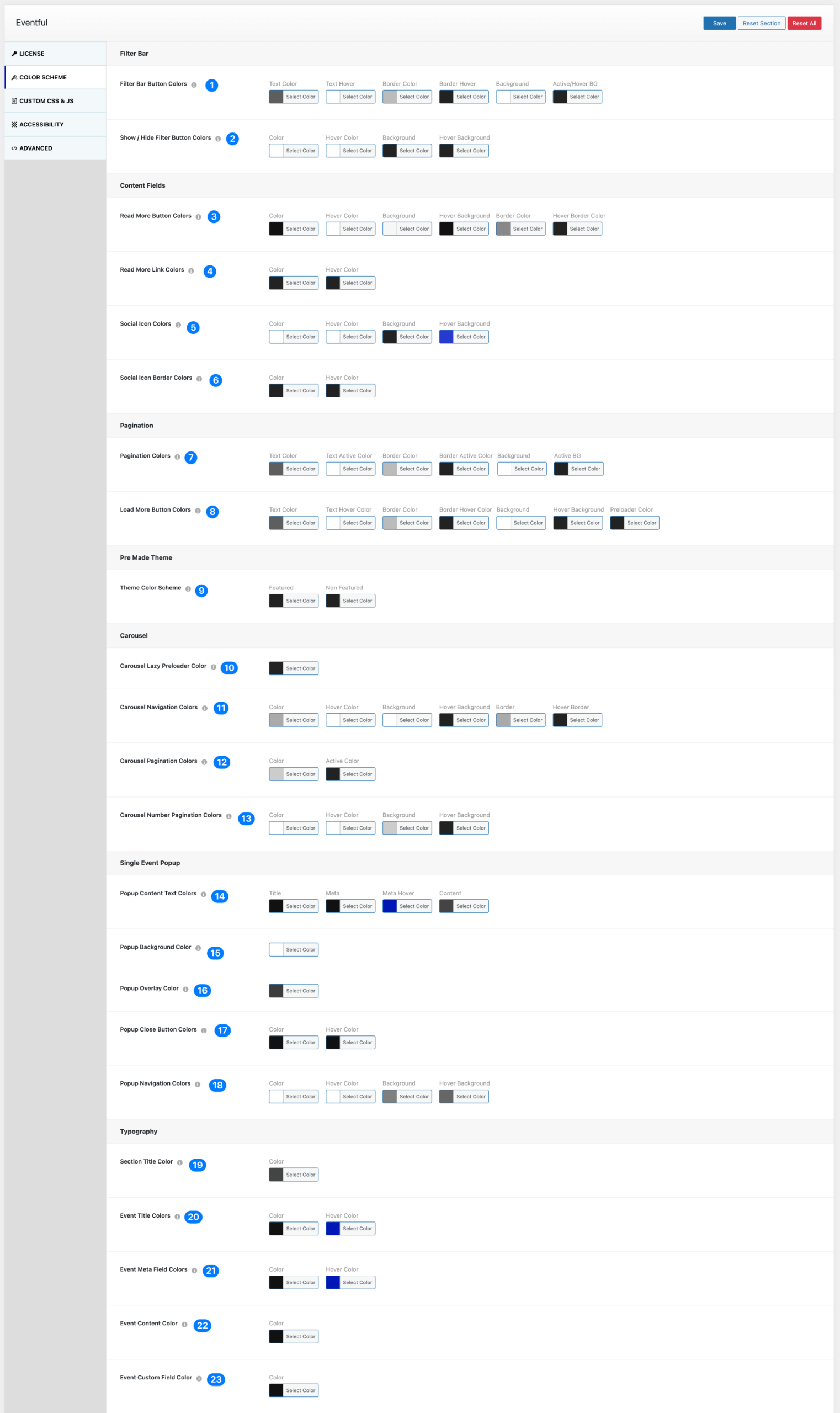
Global Color Scheme Settings #
You can define a global default color scheme for Eventful under:
Eventful → Settings → Color Scheme
This allows you to match Eventful with your brand colors without manually adjusting each layout.
These settings apply globally to all layouts.
If needed, individual layouts can override these colors inside their own layout settings.
How to Use #
- Go to Eventful → Settings
- Click on Color Scheme
- Adjust the colors as needed
- Click Save
All layouts will automatically use these colors unless overridden inside a specific layout.
Filter Bar #
- Filter Bar Button Colors – Controls the appearance of filter bar buttons. Available options:
- Text Color
- Text Hover
- Border Color
- Border Hover
- Background
- Active/Hover Background
- Show / Hide Filter Button Colors – Controls the styling of the show/hide toggle button for filters. Available options:
- Color
- Hover Color
- Background
- Hover Background
Content Fields #
- Read More Button Colors – Controls the styling of the “Read More” button. Available options:
- Text Color
- Hover Color
- Background
- Hover Background
- Border Color
- Hover Border Color
- Read More Link Colors – Controls simple text-style “Read More” links. Available options:
- Color
- Hover Color
- Social Icon Colors – Controls social share icon styling. Available options:
- Icon Color
- Hover Color
- Background
- Hover Background
- Social Icon Border Colors – Controls border styling for social icons. Available options:
- Border Color
- Hover Border Color
Pagination #
- Pagination Colors – Controls standard pagination styling. Available options:
- Text Color
- Text Active Color
- Border Color
- Border Active Color
- Background
- Active Background
- Load More Button Colors – Controls the styling of the “Load More” button. Available options:
- Text Color
- Text Hover Color
- Border Color
- Border Hover Color
- Background
- Hover Background
- Preloader Color
Pre-Made Theme #
- Theme Color Scheme – Defines default accent colors used in pre-made templates. Available options:
- Featured
- Non-Featured
This helps visually differentiate highlighted events.
Carousel #
- Carousel Lazy Preloader Color – Controls the color of the carousel loading indicator.
- Carousel Navigation Colors – Controls next/previous arrow styling. Available options:
- Icon Color
- Hover Color
- Background
- Hover Background
- Border
- Hover Border
- Carousel Pagination Colors – Controls dot-style pagination indicators. Available options:
- Color
- Active Color
- Carousel Number Pagination Colors – Controls numeric pagination styling. Available options:
- Text Color
- Hover Color
- Background
- Hover Background
Single Event Popup #
- Popup Content Text Colors – Controls text styling inside the popup. Available options:
- Title
- Meta
- Meta Hover
- Content
- Popup Background Color – Controls the popup container background color.
- Popup Overlay Color – Controls the overlay background behind the popup.
- Popup Close Button Colors – Controls the popup close button styling. Available options:
- Color
- Hover Color
- Popup Navigation Colors – Controls popup navigation (next/previous). Available options:
- Icon Color
- Hover Color
- Background
- Hover Background
Typography #
- Section Title Color – Controls section title color across layouts.
- Event Title Colors – Controls event title styling. Available options:
- Color
- Hover Color
- Event Meta Field Colors – Controls date, category, venue, and other meta field colors. Available options:
- Color
- Hover Color
- Event Content Color – Controls event description text color.
- Event Custom Field Color – Controls custom field display color.
Important Notes #
- These settings act as global defaults.
- Layout-level color settings will override global colors.
- Updating the global scheme automatically updates all layouts.
- Ideal for maintaining brand consistency across multiple event displays.


