



The Events Calendar is the most popular event plugin for WordPress, active on over 700,000 sites (WordPress.org, July 2026). But if you’ve used it for more than a week, you already know the catch: the default views are plain, there’s no slider or carousel, and features like ticketing and imports live behind paid upgrades. We’ve spent years building and testing tools in this ecosystem, and in this guide we’re rounding up the best events calendar add-ons and extensions for 2026 — with real prices, what each one actually does, and where each falls short.
One thing before the list: the ecosystem changed a lot this year, so several add-ons you may have read about elsewhere no longer exist as separate products. We’ll cover that first.
Table of Contents
Key Takeaways
- Big 2026 change: Liquid Web merged Filter Bar, Virtual Events, Community Events, and Event Aggregator into its Essentials/Pro/Elite plans — they’re no longer sold as standalone add-ons.
- Eventful — best for modern event layouts: sliders, carousels, grids, and timelines on top of the free plugin (free; Pro from $49/year).
- The Events Calendar premium plans — best official all-in-one upgrade: recurring events, ticketing, imports, and virtual events (from $259/year).
- Event Tickets — best free way to sell tickets and collect RSVPs with Stripe and PayPal.
- The Events Calendar Shortcode & Block — best for embedding event lists in any post, page, or widget.
- Events Widgets for Elementor — best for Elementor-built sites (free; Pro from $49).
- WP Event Aggregator — best free replacement for importing events from Eventbrite, Meetup, and Google Calendar.
- Event Single Page Builder — best for designing custom event detail pages (from $49).
- Events Speakers & Sponsors — best for conferences and summits that need presenter profiles (from $49).
- Event Calendar Newsletter — best for turning your event list into an email newsletter (free; Pro from $99).
What Changed for The Events Calendar in 2026?
In 2026, Liquid Web retired its StellarWP brand and consolidated The Events Calendar’s entire premium lineup into three plans — Essentials ($259/year), Pro ($399/year), and Elite ($599/year) — listed on the official product page. The old theeventscalendar.com site now redirects to liquidweb.com, and the standalone product pages are gone (The Repository, 2026).
Practically, that means Events Calendar Pro, Filter Bar, Virtual Events, Community Events, Event Aggregator, and Event Tickets Plus are no longer separate purchases. Their features now live inside the plans: Essentials covers recurring events, seven calendar views, virtual events, community submissions, and 100 imports per day. Existing license holders were grandfathered in, so if you already own Filter Bar or Community Events, they keep working.
Two more quiet changes worth knowing. Category Colors — long a must-install add-on — was merged directly into the core free plugin in version 6.14, so you no longer need anything extra for color-coded categories. And the free plugins (The Events Calendar and Event Tickets) remain free on WordPress.org, still actively updated.
Why Do You Still Need The Events Calendar Add-ons?
Because the free core plugin, good as it is, stops at the basics. Out of the box you get month, list, and day views with a fairly plain design — and that’s it. Here’s what’s missing:
- No modern layouts. No sliders, carousels, grids, timelines, or masonry displays. Your events look like a list from 2015.
- No recurring events. A weekly meetup means creating each occurrence by hand.
- Limited placement control. Embedding a filtered event list inside an arbitrary page or sidebar takes extra work.
- No ticketing, imports, or frontend submissions without additional plugins or a paid plan.
- No email marketing. There’s no built-in way to send upcoming events to subscribers.
The good news? You don’t need to buy everything. Most sites need exactly one or two of the add-ons below. Let’s get into them.
1. Eventful — Best for Modern Layouts and Design

This is the presentation layer The Events Calendar always needed. Eventful takes your existing events and displays them in modern layouts — event sliders, carousels, grids, minimal lists, tickers, masonry, and vertical timelines — through a shortcode generator with 300+ visual customization options. No coding, and it works with the free version of The Events Calendar, so you don’t need a paid plan just to make your events look good.
- 8+ layout styles: carousel, grid, list, ticker, timeline, masonry, and more
- Works with Gutenberg, Elementor, Divi, WPBakery, and Brizy
- Filter events by category, tag, date, and keyword
- Typography controls with 840+ Google Fonts, plus 30+ carousel settings
- SEO schema support, RTL, and WPML/Polylang compatibility
Pricing: Free on WordPress.org. Pro starts at $49/year for one site or $149 lifetime, with a 14-day money-back guarantee — and it’s frequently discounted well below that.
Honest limits: Eventful is display-only. It won’t add recurring events or ticketing — pair it with the plugins below for those. It’s also a newer player with a smaller install base than the giants on this list, though it holds a 5.0-star rating and shipped its latest update in July 2026.
Best for: Anyone who wants their events to look like they were designed this decade — without paying $259/year for features they won’t use.
2. The Events Calendar Premium Plans — Best Official All-in-One Upgrade
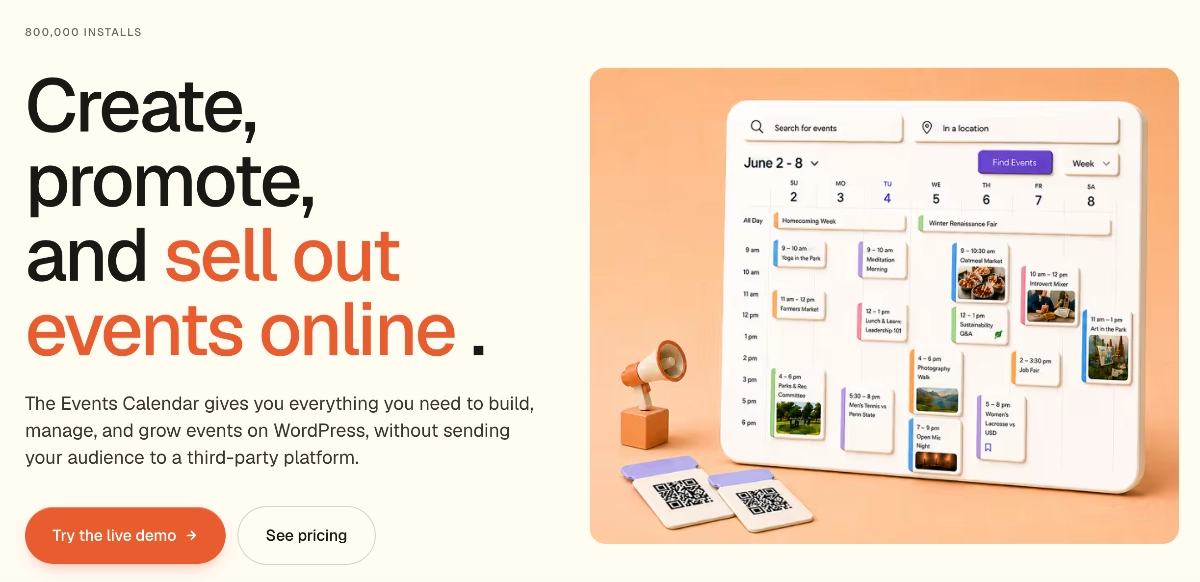
The official upgrade path, formerly known as Events Calendar Pro. The Essentials plan now bundles what used to be five separate add-ons: recurring events and series, seven calendar views, virtual and hybrid events, frontend community submissions, and event importing at 100 imports per day.
- Recurring events with daily, weekly, monthly, and custom patterns
- Week, photo, map, and summary views on top of the free ones
- Virtual events with Zoom, Teams, and Google Meet connections
- Community event submissions from your visitors
- Higher tiers add WooCommerce ticketing, QR check-in, and seat maps
Pricing: Essentials $259/year, Pro $399/year, Elite $599/year (per the official Liquid Web product page, July 2026).
Honest limits: The bundling cuts both ways. You get a lot, but if you only wanted recurring events, $259/year is a steep entry point compared to the old $149 standalone Pro license. Design customization is still limited — the premium views inherit the same conservative styling as the free plugin.
Best for: Organizations that need recurring events, imports, and community submissions together and want everything supported by one vendor.
3. Event Tickets — Best Free Ticketing and RSVPs
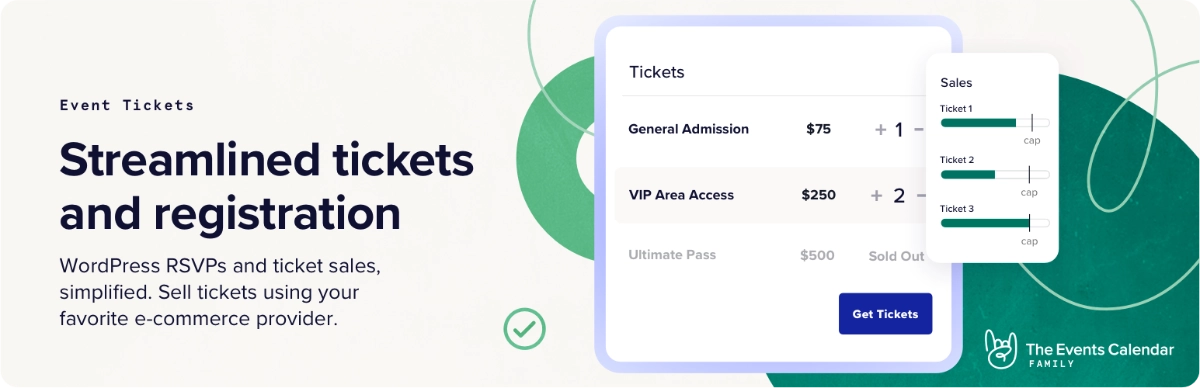
Made by the same team, Event Tickets is active on 90,000+ sites and lets you collect RSVPs and sell tickets directly from event pages. The free Tickets Commerce system takes payments through Stripe and PayPal, which is genuinely enough for many small organizations — no premium plan required.
- Free RSVPs with attendee management
- Sell tickets via Stripe, PayPal, and Paystack
- Attendee lists and basic reporting in the dashboard
- Works standalone or with The Events Calendar
Pricing: Free. Advanced features — custom registration fields, QR check-in, Apple Wallet passes, WooCommerce gateways — now require the Pro plan at $399/year.
Honest limits: Its 3.5-star rating on WordPress.org reflects a mixed support record, and the jump from free to $399/year is jarring if you only need one premium ticketing feature.
Best for: Free events, meetups, and small paid events where Stripe or PayPal checkout is enough.
4. The Events Calendar Shortcode & Block — Best for Embedding Events Anywhere
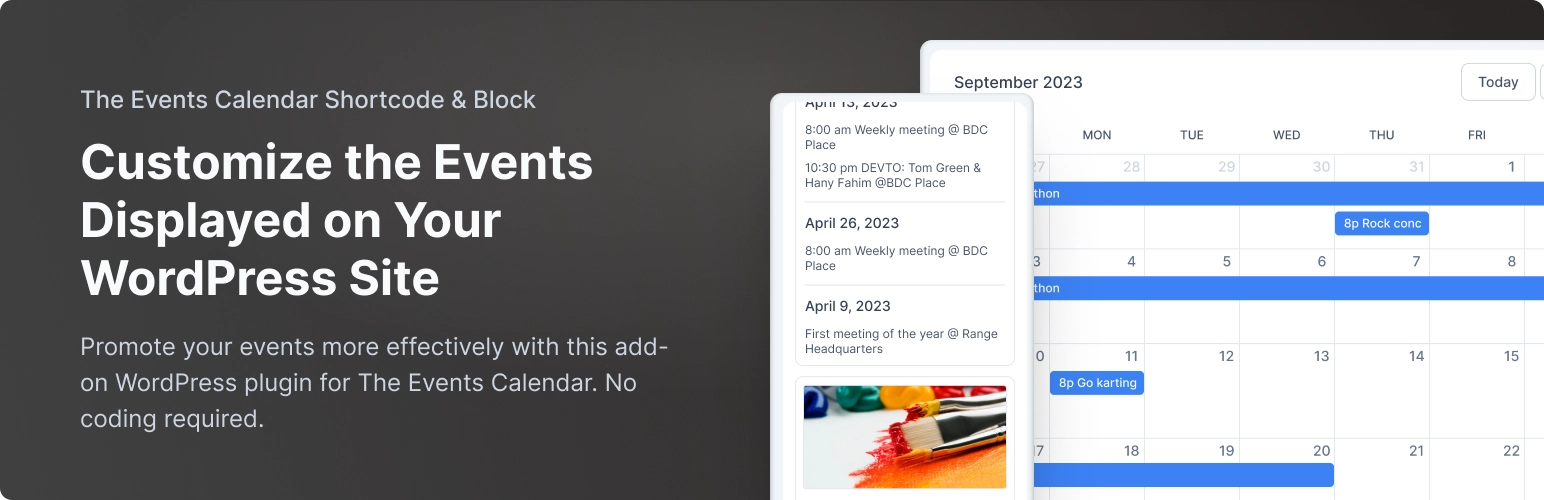
A long-standing community favorite. The Events Calendar Shortcode & Block (10,000+ installs, 4.7 stars) does one job well: it drops a filtered list of events into any post, page, or widget using a shortcode, Gutenberg block, Elementor widget, or Bricks element.
- Filter by category, date, and venue
- Control which details show: thumbnails, excerpts, dates, venues
- Gutenberg, Elementor, and Bricks support
Pricing: Free. A paid Pro version adds seven design options (calendar, compact, and column layouts), a filter bar, pagination, and recurring event controls.
Honest limits: The free version outputs a simple list — the attractive layouts sit behind Pro, and even those are more utilitarian than Eventful’s designs.
Best for: Quickly embedding a clean, filtered event list on a homepage or sidebar.
5. Events Widgets for Elementor — Best for Elementor Sites
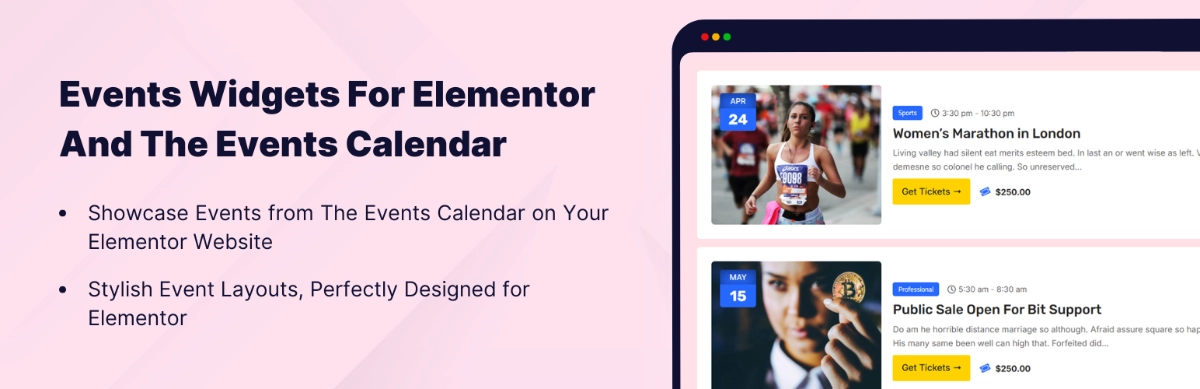
If your site is built with Elementor, Events Widgets for Elementor by Cool Plugins (10,000+ installs, 4.5 stars) gives you native drag-and-drop event widgets instead of shortcodes. The free version includes list and calendar layouts with category filtering and schema markup.
- Native Elementor widgets — style events with familiar Elementor controls
- Pro adds grid and carousel layouts plus an events loop builder
- AJAX search and filter bar by date, category, venue, and organizer (Pro)
Pricing: Free; Pro starts at $49.
Honest limits: Useless without Elementor, and the layouts most people actually want (grid, carousel) are Pro-only.
Best for: Elementor users who want to design event sections inside the builder they already know.
6. WP Event Aggregator — Best for Importing External Events
With the official Event Aggregator now locked inside the $259+/year plans, WP Event Aggregator by Xylus Themes (4.6 stars) is the best independent alternative. It imports events from Eventbrite, Meetup, Facebook, Google Calendar, Outlook, and iCal/ICS feeds straight into The Events Calendar.
- Imports from Eventbrite, Meetup, Facebook, Google Calendar, and iCal
- Works with The Events Calendar plus 12 other event plugins
- Pro adds scheduled/automated imports and CSV, XML, and JSON files
Pricing: Free; Pro upgrade available via Xylus Themes.
Honest limits: Free imports are mostly manual — automation needs Pro. Facebook imports also depend on Facebook’s API moods, which is true of every tool in this category.
Best for: Community hubs and directories that aggregate events published elsewhere.
7. Event Single Page Builder — Best for Custom Event Detail Pages
Add-ons like Eventful transform your event listings, but the single event page itself still follows the plugin’s rigid template. Event Single Page Builder by Cool Plugins fixes that with a dedicated builder for the event detail layout — reorder the schedule, map, organizer, and description sections to match your brand.
- Drag-and-drop layout control for single event pages
- Custom sections for schedules, venues, maps, and CTAs
- Consistent template across all events
Pricing: Starts at $49; also included in Cool Plugins’ five-plugin bundle from $100.
Honest limits: Scope is narrow — it only touches single event pages, so you’ll still want a separate solution for archive and listing views.
Best for: Sites where the event detail page is the conversion point — ticketed events, paid workshops, venue pages.
8. Events Speakers & Sponsors — Best for Conferences
Running a conference, summit, or festival? The Events Calendar has no concept of speakers or sponsors. This Cool Plugins add-on adds both as first-class content: presenter profiles with photos, bios, and links, plus sponsor logos attached to each event.
- Speaker profiles with photos, bios, and social links
- Sponsor showcases with logos and links per event
- Reusable profiles across multiple events
Pricing: Starts at $49.
Honest limits: It’s a niche tool. If your events don’t have named speakers or sponsors, skip it entirely.
Best for: Conferences, summits, church series, and any event where “who’s speaking” sells tickets.
9. Event Calendar Newsletter — Best for Emailing Your Events
Event Calendar Newsletter (4.8 stars) solves an underrated problem: getting upcoming events into your email newsletter without retyping them. It pulls events from The Events Calendar into formatted, copy-paste-ready newsletter content for Mailchimp, MailPoet, ActiveCampaign, and others.
- One-click newsletter generation from your event list
- Configurable time frames from one week to twelve months ahead
- Pro adds category filtering, saved templates, and automated mailings
Pricing: Free; Pro from $99.
Honest limits: A small install base (600+), and the $99 Pro price is high next to the $49 tools on this list. The free version’s manual copy-paste flow works fine for a monthly newsletter, though.
Best for: Nonprofits and community organizations that promote events by email every week or month.
Comparison: The Events Calendar Add-ons at a Glance
| Add-on | Best for | Free version | Starting price |
|---|---|---|---|
| Eventful | Modern layouts & design | Yes | $49/yr or $149 lifetime |
| TEC Premium Plans | Official all-in-one upgrade | Core plugin only | $259/yr |
| Event Tickets | RSVPs & ticket sales | Yes | Free ($399/yr plan for advanced) |
| TEC Shortcode & Block | Embedding events anywhere | Yes | Paid Pro upgrade |
| Events Widgets for Elementor | Elementor sites | Yes | $49 |
| WP Event Aggregator | Importing external events | Yes | Paid Pro upgrade |
| Event Single Page Builder | Custom event detail pages | No | $49 |
| Events Speakers & Sponsors | Conferences & summits | No | $49 |
| Event Calendar Newsletter | Event email newsletters | Yes | $99 |
How to Choose the Best Events Calendar Add-ons for Your Stack
Nobody needs all nine. Match your stack to what your site actually does:
- Small business or nonprofit on a budget: Free The Events Calendar + Eventful. You get professional-looking event displays for $0–$49/year, which covers what most small sites need.
- Community hub or events directory: TEC Essentials plan (community submissions + imports) + Eventful for the public-facing layouts. The plan handles the data; Eventful handles the presentation.
- Ticketed events and workshops: Free Event Tickets + Event Single Page Builder + Eventful. Sell through Stripe or PayPal, and make both the listing and the detail page earn the click.
- Conference or summit: TEC Essentials (recurring sessions, virtual events) + Events Speakers & Sponsors + Eventful’s grid or timeline layout for the schedule page.
- Newsletter-driven organization: Free The Events Calendar + Event Calendar Newsletter + Eventful’s carousel on the homepage to catch web visitors too.
Notice the pattern? Whatever handles your event data, you still need something for how events look. That’s why a presentation add-on pairs with everything else on this list rather than competing with it.
Frequently Asked Questions
What are the best free add-ons for The Events Calendar?
Eventful (modern layouts), Event Tickets (RSVPs and ticket sales), The Events Calendar Shortcode & Block (embedding), WP Event Aggregator (imports), and Event Calendar Newsletter (email) all offer genuinely useful free versions on WordPress.org. Combined, they cover design, ticketing, and promotion without spending anything.
Are Filter Bar, Community Events, and Event Aggregator still sold separately?
No. As of 2026, Liquid Web folded them — along with Virtual Events and Event Tickets Plus — into The Events Calendar’s Essentials ($259/yr), Pro ($399/yr), and Elite ($599/yr) plans. Existing standalone licenses were grandfathered and continue to work.
Does Eventful work with the free version of The Events Calendar?
Yes. Eventful only requires the free The Events Calendar plugin — no premium plan needed. All of its layouts, including sliders, carousels, grids, and timelines, work with free events, and it’s compatible with Gutenberg, Elementor, Divi, WPBakery, and Brizy.
How much does Events Calendar Pro cost in 2026?
Events Calendar Pro no longer exists as a standalone plugin. Its features now start in the Essentials plan at $259/year, with Pro at $399/year and Elite at $599/year. That’s a higher entry point than the old $149 standalone license, but each plan bundles several former add-ons.
Can I sell tickets with The Events Calendar for free?
Yes. The free Event Tickets plugin includes Tickets Commerce, which processes payments through Stripe and PayPal at no plugin cost (standard payment processing fees still apply). Advanced features like QR check-in and WooCommerce gateways require the $399/year Pro plan.
Final Thoughts
The 2026 consolidation simplified the official lineup but raised its price — which makes the independent ecosystem more valuable than ever. Our honest take on the best events calendar add-ons: start free, add the official plans only when you need recurring events, imports, or community submissions, and let purpose-built tools handle the rest.
And whatever your stack looks like, the first upgrade almost every site benefits from is visual. Download Eventful free from WordPress.org and see what your existing events look like in a carousel, grid, or timeline — it takes about five minutes, and there’s nothing to buy to try it.