


If you help run a church, a nonprofit, or a local community group, you already know the drill. Someone asks, “When’s the next service?” or “What time does the fundraiser start?” and you’re digging through Facebook posts, group texts, and a printed flyer taped to the fridge. A proper church events page (or nonprofit or community version) fixes that headache for good. It gives everyone one clear, always-current place to find what’s happening and when.
Here’s the encouraging part: you don’t need to be technical to build one. If you can write a Facebook post, you can set up a beautiful events page on your WordPress site in an afternoon.
This matters more than you might think. As of 2025, 78% of churchgoers say they use a church website to find service times and events, yet 65% of church websites don’t prominently feature upcoming events at all (WiFiTalents, Church Website Statistics, 2025). That gap is a missed opportunity — and it’s an easy one to close.
Key Takeaways
- One home for everything. A dedicated church events page replaces scattered flyers, texts, and social posts with a single, always-current source people can trust.
- You don’t need code. A free WordPress plugin like Eventful lets non-technical volunteers create a polished events page with no development skills.
- Mobile comes first. Around 63% of all web traffic is now on phones, so your events page has to look great on a small screen (Gitnux, Church Website Statistics, 2025).
- Events drive engagement. 97% of nonprofits held an event in 2025, and those that did were far more likely to hit their goals than those that didn’t (NonProfit PRO, 2025).
- Clarity beats cleverness. The best events pages are simple: clear dates, times, locations, and one obvious next step for the visitor.
Table of Contents
Why Every Church, Nonprofit, and Community Group Needs a Real Events Page
Let’s be honest about how most groups handle events today. There’s a post buried three weeks deep on Facebook, a reminder in a group chat that half the people muted, and maybe a sign-up sheet someone forgot to bring. It works, sort of. But it leaks people.
A real church events page pulls all of that into one place you control. When a newcomer visits your site, they see exactly what’s coming up without asking a soul. That’s a big deal, because 19% of church website visitors use the site to RSVP or sign up for events, and community festivals see up to a 55% jump in attendance when they’re promoted well online (WiFiTalents, Community Engagement Statistics, 2025).
There’s a trust factor too. When your WordPress events page is clean and up to date, it quietly tells visitors, “This group has its act together. You can count on us.” That impression makes first-timers far more likely to show up.
And it saves you time. Instead of answering the same “what time?” question fifteen times, you point people to one link. Set it once, and it works while you sleep.
What Makes a Good Events Page (The Simple Essentials)
Before we build anything, let’s agree on what “good” looks like. You don’t need bells and whistles. You need clarity. A great church events page answers four questions at a glance: what, when, where, and what do I do next?
- Clear titles. “Sunday Morning Worship” beats “Weekly Gathering #47.” Say what it is in plain words.
- Obvious dates and times. Include the day, date, start time, and end time. Don’t make people guess.
- Location or link. A physical address with a map, or a Zoom link for online events. Both if it’s hybrid.
- A short description. Two or three friendly sentences. What happens? Who’s it for? Should they bring anything?
- A next step. “RSVP here,” “Add to calendar,” or “Just show up.” Tell people exactly what to do.
- A mobile-friendly layout. It has to look good on a phone, since that’s how most people will see it.
That’s the whole recipe. If your church events page nails those six things, you’re ahead of most organizations out there.
How to Build Your Church Events Page in WordPress (Step by Step)
Ready to actually build it? Good news: WordPress powers roughly 43% of all websites on the internet, so there’s a huge, friendly ecosystem of free tools built exactly for this (W3Techs, WordPress Usage Statistics, 2026). You just need the right one.
For a group on a budget, I’d point you toward Eventful, a free WordPress events plugin. It’s designed to display events beautifully without asking you to touch a line of code. Here’s how the whole thing comes together.
A quick note on transparency: We build Eventful, so we’re clearly fans of it. We’ve kept this guide plugin-agnostic wherever we can — every principle here works with any events tool you choose. We just think Eventful is a friendly place for beginners to start, and it’s free to try. You be the judge.
Step 1: Install the free plugin
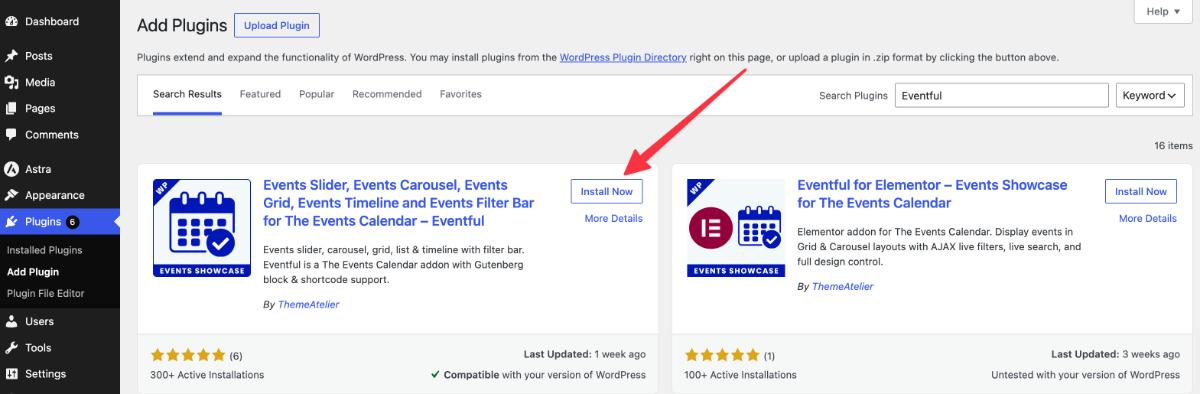
Log into your WordPress dashboard. On the left menu, hover over Plugins and click Add New. In the search box, type “Eventful.” When it appears, click Install Now, then Activate. That’s it — you’ve just added event superpowers to your site.
Step 2: Add your first event
Look for the new Events item in your dashboard menu and click Add New. You’ll get a simple form. Fill in the event title, the date and time, and the location. Add a warm description that tells people what to expect. Upload a photo if you have one — a friendly image does a lot of quiet work.
Step 3: Display your events on a page
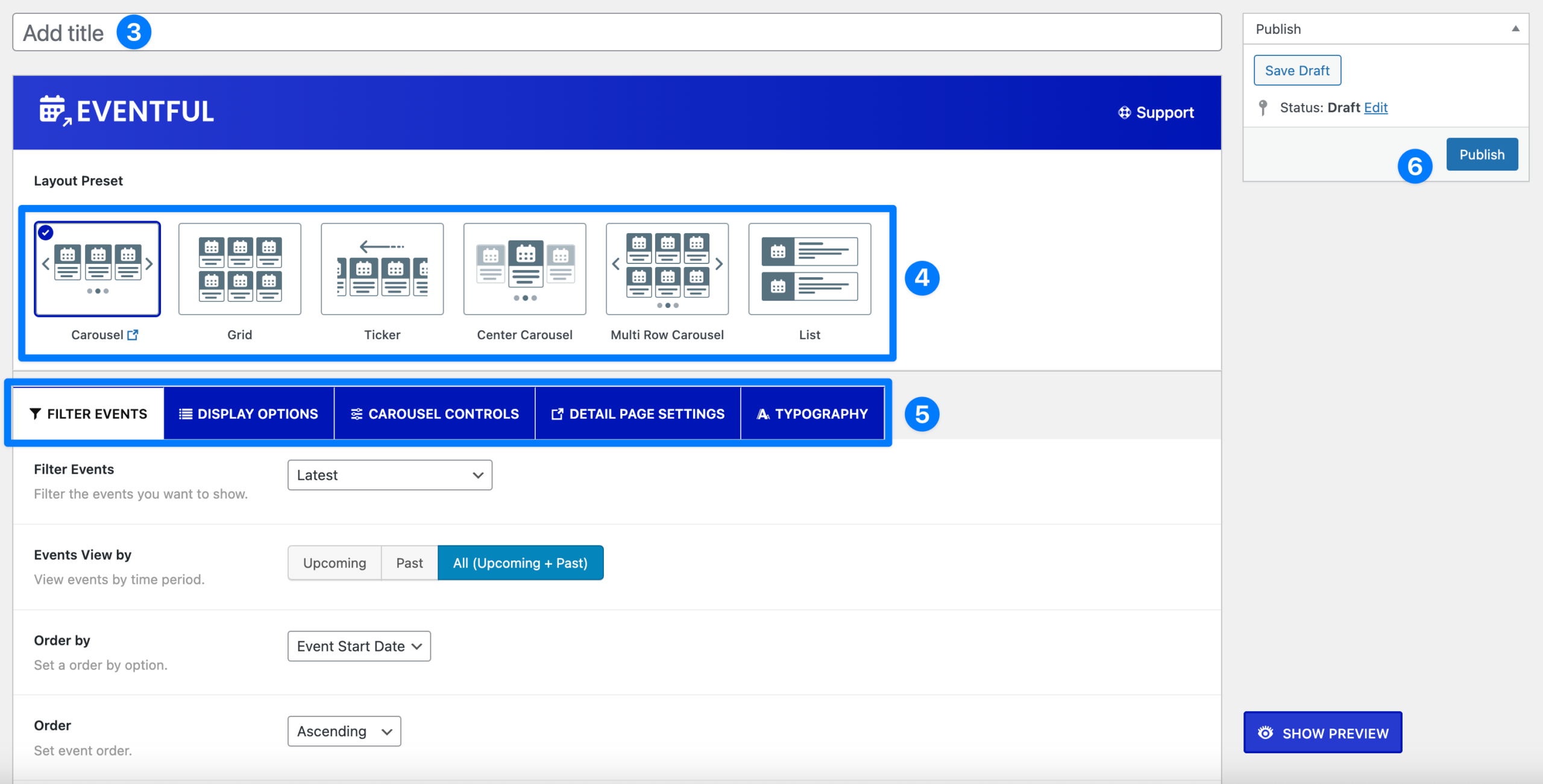
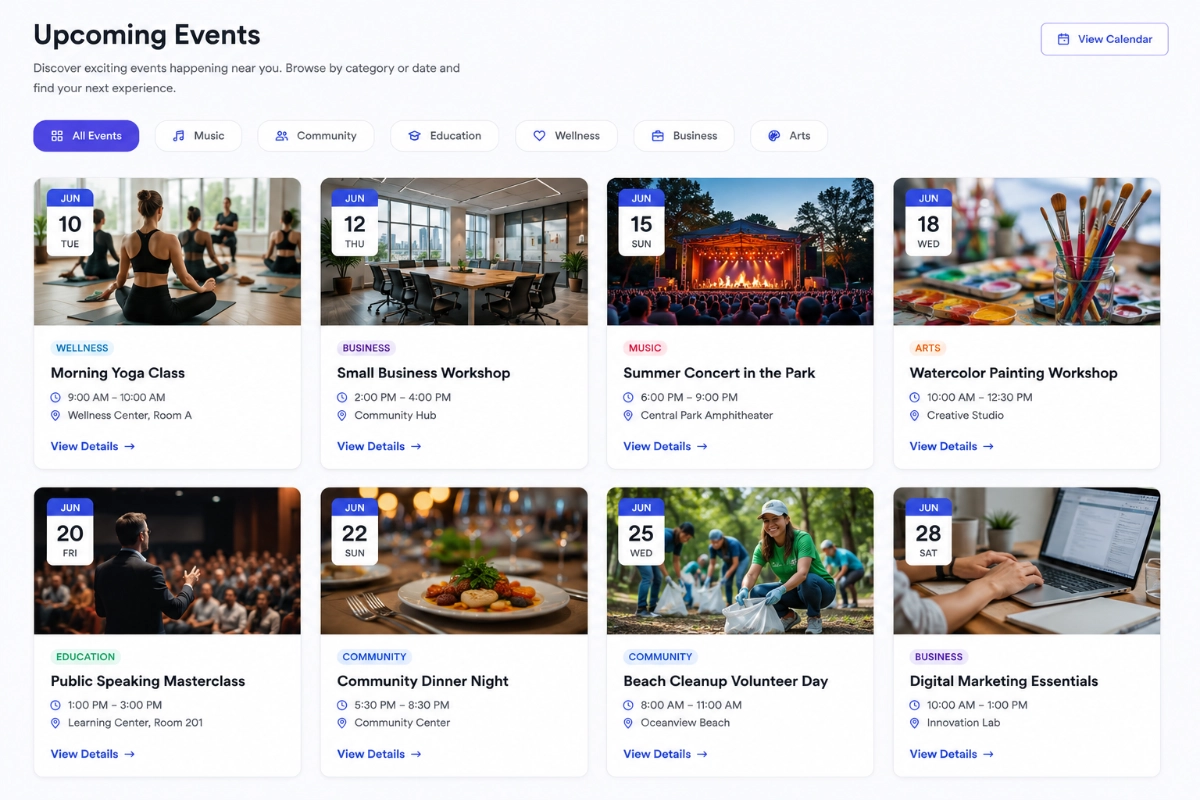
Create a new page (call it “Events” or “What’s On”), and drop in the Eventful block or shortcode. Your events instantly appear in a tidy, organized list or calendar. You add an event once, and it shows up here automatically. No copy-pasting, no manual updates.
Step 4: Add it to your menu
Go to Appearance > Menus and add your new Events page to the main navigation. Now anyone visiting your site can find your calendar in one click. Preview it on your phone to make sure it looks great — remember, that’s where most people will see it.
And you’re done. Seriously. From here, every future event is just a two-minute “Add New” away. You can learn more about the plugin’s features over at wpeventful.com whenever you’re ready to go deeper.
Tailoring Your Events Page for Your Kind of Group
The building blocks are the same for everyone, but the little details change depending on who you serve. Here’s how to make your page feel right for a church, a nonprofit, or a community group.
For churches
Your church events page has two jobs: your regulars want service times, and your visitors want to know they’ll be welcome. Lead with recurring events — Sunday worship, midweek Bible study, youth group — so the rhythm of church life is obvious at a glance.
Add special dates like Christmas services, baptisms, and community outreach nights. A warm description matters here. “Come as you are, coffee’s on us” does more to reassure a nervous newcomer than a formal notice ever could. Given that 78% of churchgoers check the website for service times, this page might be the single most-visited part of your site (Communicate Jesus, 2025).
For nonprofits
For nonprofit events, the goal is usually turnout and dollars. Your page should make it dead simple to register, donate, or volunteer. Feature your big fundraisers front and center, and include a clear RSVP or ticket link.
The stakes are real: in 2025, 97% of nonprofits held an event, and those that did were far more likely to hit their fundraising goals — while 46% of the nonprofits that skipped events fell short (NonProfit PRO, 2025). A clear events page is a quiet fundraising tool. Don’t forget to add photos from past events; they show impact and build trust with new supporters.
For community groups
Whether you’re a garden club, a neighborhood association, or a local sports league, community group events thrive on being easy to discover. Keep your titles casual and friendly — “Saturday Park Cleanup” or “Family Movie Night in the Square.”
Because a lot of your attendees decide last-minute — one study found 57% of event tickets are booked a week or less before the event — keep your page current and easy to share (Swoogo, Event Statistics, 2025). A shareable link that looks good when posted to Facebook or a group chat is worth its weight in gold.
Common Mistakes to Avoid
You’re going to do great. A church events page is simple to build, but a few small traps catch almost everyone, so let’s dodge them ahead of time.
- Letting it go stale. Nothing kills trust like a “past” event still sitting at the top of the page. Set a reminder to keep it current — or lean on a plugin that automatically hides events after they end.
- Forgetting the phone. If your page is a nightmare to read on a small screen, you’re losing most of your audience. Always preview on mobile before you publish.
- Burying the page. An events page nobody can find isn’t much use. Put it in your main menu and link to it from your homepage.
- Writing like a robot. “Attendance is mandatory for all congregants” is cold. “We’d love to see you there” is warm. Write the way you’d actually talk.
- Skipping the details. A title with no time, address, or description just creates more questions. Fill in every field, every time.
- Overcomplicating it. You don’t need ticketing, seat maps, and five plugins for a coffee morning. Start simple and add features only when you truly need them.
Avoid those six, and your page will already be more useful than most. Progress beats perfection here.
Frequently Asked Questions
How do I add an events calendar to my WordPress site for free?
Install a free events plugin from your dashboard under Plugins > Add New. A free option like Eventful lets you add events and display them on a page in minutes, no coding needed. Because WordPress powers around 43% of the web, these free tools are mature, well-supported, and beginner-friendly.
Do I need to know how to code to build a church events page?
Not at all. Modern WordPress plugins are built for non-technical volunteers. If you can fill out an online form and click a few buttons, you can build a full church events page. Most people finish their first working version in under an hour, then add events as they come up.
What’s the difference between an events page and just posting on Facebook?
Facebook posts vanish down the feed within hours, and not everyone follows your page. A website events page is permanent, always current, and something you fully control. It also shows up in Google searches, helping new people discover you — something a buried social post rarely does.
How do I keep my events page from looking outdated?
Choose a plugin that automatically moves past events out of view once they’re over, so your page always shows what’s coming up next. Then build a simple habit: add new events as soon as you schedule them. Five minutes a week keeps everything fresh and trustworthy.
Can one events page work for a hybrid or online event?
Yes. Just include both a physical address and an online link (like Zoom) in the event details. With 74.5% of event planners now using hybrid formats in 2025, most plugins handle this easily. Make it clear in the description whether people can join in person, online, or both.
Ready to Build Your Events Page?
Building a church events page — or a nonprofit or community version — isn’t a technical project. It’s a hospitality project. You’re making it easy for people to find their way to the good things your group is doing, and that’s worth an afternoon of your time.
Start small. Install a free plugin, add your next three events to your church events page, and put it in your menu. That alone puts you ahead of the 65% of organizations still hiding their events. You can always add more polish later.
If you’d like a simple, free way to get started, Eventful was built exactly for groups like yours — warm, no-fuss, and easy on beginners. Give it a try, add your first event, and see how much lighter your inbox feels when everyone finally knows what’s happening and when. You can find setup guides and more at wpeventful.com whenever you’re ready.
Sources
- WiFiTalents, Church Website Statistics, retrieved 2026-07-21, https://wifitalents.com/church-website-statistics/
- WiFiTalents, Community Engagement Statistics, retrieved 2026-07-21, https://wifitalents.com/community-engagement-statistics/
- Gitnux, Church Website Statistics, retrieved 2026-07-21, https://gitnux.org/church-website-statistics/
- Communicate Jesus, 12 Essential Statistics for Your Church’s Website, retrieved 2026-07-21, https://www.communicatejesus.com/post/12-essential-statistics-church-website
- NonProfit PRO, 77% of Nonprofits Hit Event Goals Despite 2025 Instability, retrieved 2026-07-21, https://www.nonprofitpro.com/article/report-77-of-nonprofits-hit-event-goals-despite-2025-instability/
- Swoogo, The Big List of Event Statistics for 2025, retrieved 2026-07-21, https://swoogo.events/blog/event-statistics/
- W3Techs, Usage Statistics and Market Share of WordPress, retrieved 2026-07-21, https://w3techs.com/technologies/details/cm-wordpress