

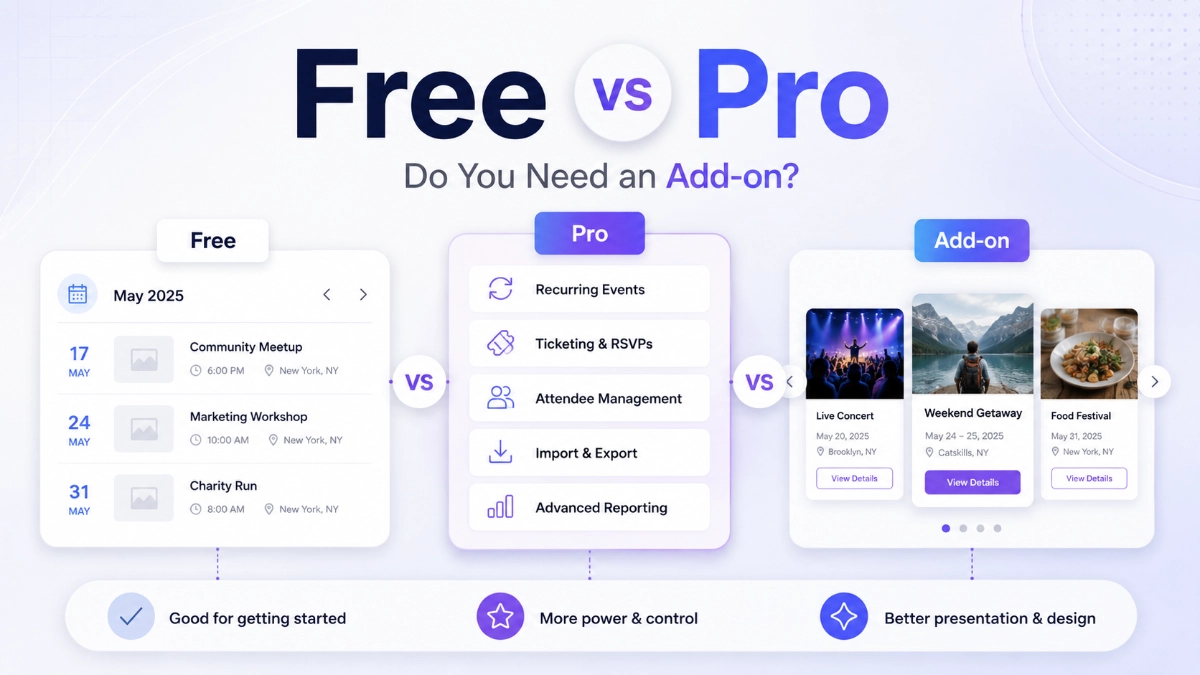

You installed The Events Calendar, published a handful of events, and it worked. Then you looked at your homepage — or tried to filter events by category — and the free plugin didn’t do what you pictured. Now you’re staring at a pricing page, unsure whether the fix is Essentials, Pro, or Elite. That’s the question this article answers: the events calendar free vs pro, and which one solves your problem.
There’s no universal winner here. What follows is a plain breakdown of what the free plugin already covers, what each paid tier adds, and — because this trips up a lot of site owners — why the fix you need might not be a bigger calendar plan at all.
Key Takeaways
- The Events Calendar free plugin already includes month/list/day views, venues, organizers, categories, Google Maps, calendar exports, and CSV imports — no upgrade required.
- Current paid plans are Essentials ($259/year), Pro ($399/year), and Elite ($599/year), each adding operational features like recurring events, ticketing, and attendee tools.
- Homepage carousels, branded grids, timelines, and Ajax filtering aren’t part of any Events Calendar tier — they’re a separate presentation layer.
- Eventful is a display and filtering add-on for The Events Calendar’s free version, starting at $49/year for one site, and it doesn’t sell tickets or manage attendees.
- Eventful currently holds a 5-out-of-5 rating from 6 WordPress.org reviews, checked August 3, 2026.
- You can run a paid Events Calendar plan and Eventful together — one manages event data and ticketing, the other handles how events look on the frontend.
- If your only problem is visual presentation, a paid Events Calendar plan won’t fix it — and neither product replaces the other.
Table of Contents
What The Events Calendar Free Actually Includes
It’s easy to assume a free plugin is a stripped-down demo of the “real” product. That’s not the case here. The Events Calendar has been around since 2009, and the free version on WordPress.org shows 600,000+ active installations as of August 3, 2026 — genuine, long-term production use, not a trial.
Free gives you rapid event creation, reusable saved venues and organizers, and three core views: month, list, and day. Visitors can search, browse by category or tag, and see locations via Google Maps. Events export to Google Calendar or iCal, and the plugin outputs JSON-LD structured data automatically, helping events surface in Google’s event-rich results.
It also includes WordPress REST API endpoints, full Block Editor support, a responsive frontend, and CSV importing for bulk entry. For a church posting Sunday services, or a small venue with a predictable schedule, that’s often everything the calendar needs to do.
Liquid Web, the company behind the premium plans, separately reports 800,000+ active installs and more than 1 billion events created. That’s a different measurement from a different source than the WordPress.org figure — worth knowing so the two numbers don’t seem contradictory.
The Events Calendar Free vs Current Paid Plans
Prices and plan contents were checked on August 3, 2026 and may change. Confirm current details on the official pricing page before purchasing.
As of this writing, the Liquid Web sales page packages premium functionality into three annual plans — Essentials, Pro, and Elite — rather than one standalone add-on. Each builds on the one below it, and all three include a 48-hour demo with no credit card required.
Essentials — $259 per year
Essentials adds seven calendar views, recurring events and series, virtual/hybrid support, custom fields, search and filters, community submissions, shortcodes, and basic ticketing via Stripe, PayPal, or Square, plus 100 imports per day. It fits organizations needing recurring events or simple ticketing, not advanced attendee tools.
Pro — $399 per year
Pro includes everything in Essentials, then removes ticket commission fees and adds WooCommerce ticket integration, revenue splitting, custom attendee registration forms, QR check-in, and attendee reporting, with imports up to 200 per day. It’s built for organizers tracking attendees at the door.
Elite — $599 per year
Elite includes everything in Pro, plus custom venue seat maps, customer seat selection, automated marketing emails, branded templates, and email analytics. It’s aimed at venues running assigned-seating events — theaters, conference halls — where seating and follow-up matter as much as the listing. All plans renew annually unless cancelled.
What Changed From the Older Events Calendar Pro Pricing?
If you’ve read other comparison articles, you may have seen an Events Calendar Pro license quoted around $99–$149 as a standalone product. That figure isn’t fabricated — it reflects older pricing that’s still floating around the web in cached posts and outdated listicles.
The current sales page packages that same premium functionality — and considerably more — into the Essentials, Pro, and Elite bundles above. Official materials, including WordPress.org release notes, may still reference the “Events Calendar Pro” name internally, so don’t take that as proof the old pricing still applies.
The practical takeaway: don’t budget off a number from a two-year-old blog post. Compare what’s actually in each current tier against what you need, using the official pricing page as your source of truth.
The Mismatch That Causes Expensive Buying Decisions
Here’s where budget gets spent on the wrong thing. Event functionality on a WordPress site breaks into five layers: management, ticketing, attendee operations, marketing, and presentation. The Events Calendar’s paid plans focus almost entirely on the first four. Presentation — how events look on the page — isn’t a major focus at any tier.
That matters because a lot of upgrade requests aren’t really about managing events better. They’re requests like “put a carousel on the homepage” or “let visitors filter without reloading the page.” Those are presentation problems, and buying a $399/year plan to solve them is often more expensive than necessary.
The table below maps common requests to what actually solves them, using current list pricing.
| Your actual problem | What solves it | Starting cost |
|---|---|---|
| Create basic events | The Events Calendar (free) | Free |
| Schedule recurring events | Essentials | $259/year |
| Sell simple tickets | Essentials | $259/year |
| Sell WooCommerce tickets | Pro | $399/year |
| Add assigned seating | Elite | $599/year |
| Accept community submissions | Essentials | $259/year |
| Place a carousel on the homepage | Eventful (free or Pro) | Free, or $49/year |
| Create branded grid or masonry layouts | Eventful Pro | $49/year |
| Add live visitor filtering | Eventful Pro | $49/year |
| Show past events separately | Eventful Pro | $49/year |
| Open event information in a popup | Eventful Pro | $49/year |
Notice what’s missing from Eventful’s column: ticketing, attendee reports, seat maps, marketing emails. Eventful doesn’t touch any of that. It presents event data that already exists — it doesn’t create or manage it.
When a Paid Events Calendar Plan Is the Right Buy
None of this argues against paying for The Events Calendar — for plenty of organizations it’s the right call. A paid plan is the right buy when you genuinely need:
- Recurring events and event series that repeat on a schedule
- Community or public event submissions from outside contributors
- High-volume automatic imports beyond the free CSV workflow
- Actual ticket sales, with or without WooCommerce
- Custom attendee registration forms and QR check-in
- Attendee reporting for post-event analysis
- Revenue splitting across multiple organizers
- Assigned seating or automated event-marketing emails
If two or more of those apply to how you run events, a paid plan pays for itself in saved manual work. For a conference selling tickets, it’s close to non-negotiable.
Need simple recurring events without upgrading?
If you only need daily or weekly repeats, you may not need a full paid plan. Bazingaworld Recurring Events Calendar is a free add-on that creates recurring dates as separate, standard events in The Events Calendar. It can be a practical alternative for straightforward schedules, although it is not the same as native recurring event series, and monthly and yearly rules are paid features. Because each occurrence is a regular event, Eventful can display these events using its existing layouts.
Before choosing this approach, check whether managing each occurrence as a separate event meets your needs.
When You May Need a Display Add-On Instead
On the other hand, you may be better served by a presentation-focused add-on rather than a bigger calendar plan if what you actually want is:
- A homepage event slider or homepage event carousel
- A grid or masonry display that matches your site’s design
- A timeline showing your event history
- A past-events archive separate from upcoming listings
- Live keyword search or live Ajax filtering for visitors
- Filtering by venue or organizer, not just category
- Event details opening in a popup instead of a full page reload
- Brand-matched card styling and typography
- More flexible placement using a shortcode or Gutenberg block
None of those require ticketing, recurring-event logic, or attendee tracking. They’re display problems, and a plan built for operations won’t solve them any better than free does.
Where Eventful Fits
This is the point to introduce Eventful — after you’ve seen what free and paid plans actually cover, not before. Eventful is a display and filtering add-on built for The Events Calendar’s free version. It doesn’t replace The Events Calendar and isn’t a ticketing or attendee-management tool; it reads your existing event data and gives you more ways to present it.
Put simply: The Events Calendar manages the event data. Eventful provides additional ways to present and filter that data. It works whether you’re on the free version or a paid plan.
Eventful free gives you five layout presets, one timeline style, an upcoming-events view, one Ajax filter type, one carousel mode, three event meta fields, five social-sharing services, shortcode support, a Gutenberg block, Elementor compatibility, and event schema support. It shows 200+ active installations and a 5-out-of-5 rating from 6 WordPress.org reviews, checked August 3, 2026 — small but positive.
Eventful Pro expands considerably: fourteen ready-made event templates, a timeline view of past and upcoming events in five styles, four Ajax filter-control types, live keyword search, filtering by category, tag, venue, organizer, date, and time, four carousel modes, popup event details, 840+ Google Fonts, thirteen social-sharing services, and layout import/export.
| Feature | Eventful Free | Eventful Pro |
|---|---|---|
| Layout presets | 5 | 14 |
| Timeline styles | 1 | 5 |
| Event views | Upcoming only | Upcoming, past, all |
| Ajax filter types | 1 | 4, plus live keyword search |
| Carousel modes | 1 | 4 |
| Social sharing services | 5 | 13 |
| Popup event details | No | Yes |
For a full breakdown, you can compare Eventful’s free and Pro plans in detail, or check Eventful’s documentation for setup specifics.
Three Real-World Scenarios With Cost Comparisons
All prices below are current standard list pricing, checked August 3, 2026. We’re not calculating commission savings, conversion gains, or break-even timelines — just what each option costs to run.
Scenario A: Community Organization or Church
Needs: publish upcoming events, add a homepage carousel, let visitors filter by category. No ticketing, no attendee reporting. Free Events Calendar already covers event creation. Eventful Free costs nothing and covers the carousel and basic filtering; Eventful Pro at $49/year adds venue and date filtering plus more layouts. There’s no clear reason to pay for Essentials, Pro, or Elite unless submissions become a real need.
Scenario B: Conference Selling Tickets
Needs: ticket sales, custom attendee forms, QR check-in, reporting, branded listings. This is where a paid plan earns its cost. Pro at $399/year covers WooCommerce ticketing, attendee forms, QR check-in, and reporting — none of which Eventful offers. Adding Eventful Pro at $49–$179/year for a filterable schedule page is optional, not a substitute for Pro.
Scenario C: Agency Managing Five Client Websites
Needs: different event layouts per client, no shared ticketing requirement, repeatable templates, import/export across five sites. Eventful’s 5-site yearly license at $99/year (or $249 lifetime) covers layout variety and template reuse directly. If a client needs recurring events or ticketing, that client separately needs an Essentials or Pro plan — those aren’t bundled with Eventful’s.
Want the side-by-side breakdown instead? Compare Eventful Free vs Pro.
Can You Use Eventful and a Paid Events Calendar Plan Together?
Yes — and for a fair number of sites, that’s the real answer. The two products sit at different layers. The Events Calendar, on any tier, stores and manages your events; a paid plan adds operational capabilities like recurring series, ticketing, and attendee handling. Eventful adds frontend layouts, discovery, and filtering, regardless of which tier you’re running.
A few realistic combinations: a venue on Events Calendar Pro for ticketing, paired with Eventful Pro for a branded homepage carousel. A nonprofit on Essentials for recurring services, paired with Eventful for a past-event archive browsable by location. Or a school on Elite for seat-assigned events, using Eventful to keep the public listing on-brand and searchable.
How to Decide in 60 Seconds
- Stay with free when you’re publishing straightforward events with no recurrence, no tickets, and the default display is acceptable.
- Buy Essentials ($259/year) when you need recurring events, community submissions, or basic ticket sales.
- Buy Pro ($399/year) when you’re selling tickets through WooCommerce, need QR check-in, or need attendee reporting.
- Buy Elite ($599/year) when you need assigned seating or automated event-marketing emails.
- Add Eventful Free when you want a basic carousel or timeline and don’t need advanced filtering.
- Add Eventful Pro ($49–$179/year) when you need branded layouts, live filtering, popups, or a past-events archive.
- Use both when you need real ticketing or attendee operations and a polished, filterable frontend.
FAQ
Is The Events Calendar free good enough for a small church or nonprofit event calendar?
For many churches and nonprofits, yes. The free version handles event creation, venues, organizers, month/list/day views, categories, and Google Maps. You’d need a paid plan only if you require recurring event series, ticket sales, or community submissions — none of which the free version includes.
What’s the actual difference between The Events Calendar Essentials, Pro, and Elite?
Essentials ($259/year) adds recurring events, virtual events, custom fields, and basic Stripe, PayPal, or Square ticketing. Pro ($399/year) removes ticket commission fees and adds WooCommerce integration, QR check-in, and attendee reporting. Elite ($599/year) adds seat maps and automated marketing emails. Each tier builds on the last.
Do I need The Events Calendar Pro to add a homepage event carousel?
No. Carousel and grid layouts aren’t part of The Events Calendar’s core feature set at any tier — that’s a presentation function, typically handled by a separate add-on like Eventful, which reads your existing event data without requiring a paid Events Calendar plan.
What is Eventful, and does it replace The Events Calendar?
Eventful is a display and filtering add-on for The Events Calendar’s free version. It doesn’t create, manage, or sell tickets for events — it presents already-published event data in carousels, grids, timelines, and filterable layouts, working alongside the free plugin or a paid plan.
Can I use Eventful and a paid Events Calendar plan together?
Yes. The Events Calendar, free or paid, manages your event data, ticketing, and recurring series, while Eventful adds frontend presentation options like carousels, Ajax filters, and popups. Many sites that sell tickets through a paid plan still use Eventful to improve how events are displayed.
Does Eventful have good reviews on WordPress.org?
Eventful currently has a 5-out-of-5 rating from 6 WordPress.org reviews, checked August 3, 2026. That’s a positive but small sample, so it’s worth reading the individual reviews and testing the free version on your own site before upgrading.
Verdict
So, the events calendar free vs pro — what’s the actual call? If you’re publishing straightforward events, free is genuinely sufficient, and there’s no reason to pay for capability you won’t use. If you’re running recurring series, selling tickets, or managing attendees, Essentials, Pro, or Elite are reasonable purchases built for that work.
But if what’s actually bothering you is how events look — a flat list where you wanted a carousel, no way to filter by venue, no separation between past and upcoming events — that’s a presentation gap, and Eventful is built for it. Some sites need one product. Plenty run both, each doing the job it’s designed for.