


A full calendar view is great for browsing, but it asks visitors to do the work of finding what’s coming up. A slider or carousel does the opposite: it puts your next few events front and center on the homepage, no clicking or scrolling required. That difference in intent is why “best event slider plugin” and “best event calendar plugin” are really two different searches.
This roundup covers seven current WordPress plugins that can genuinely turn your events into a slider or carousel — not just plugins with “slider” in the name. Each one either displays events natively, connects to a recognized event plugin like The Events Calendar, or can dynamically pull events from a custom post type without you rebuilding every slide by hand.
We looked at event-specific functionality first, then setup effort, free-tier usefulness, design flexibility, and pricing. If you already run an event slider on your WordPress homepage, this guide will help you decide whether your current plugin is still the right fit.
Table of Contents
Key Takeaways
- If you already run The Events Calendar, a purpose-built add-on like Eventful or a TEC-compatible slider will save the most setup time.
- Modern Events Calendar is the strongest standalone option — its free Lite version includes a carousel view without needing a separate event plugin.
- General-purpose slider plugins (Smart Slider 3, MetaSlider, Essential Addons) can display events, but the dynamic events feature is usually a paid upgrade.
- A plugin only qualifies as an “event slider plugin” if it can pull events automatically — manually rebuilding each slide isn’t a real event workflow.
- Pricing changes often; treat every figure below as a starting point and confirm current pricing before you buy.
Best Event Slider Plugins at a Glance
The table below compares the seven plugins by free-version availability, starting price, and how each one actually gets your events into a slider.
| Plugin | Free Version | Starting Price | Event Integration | Standout Feature | Best For |
|---|---|---|---|---|---|
| Eventful | Yes (Lite) | From $49/yr | Requires The Events Calendar | Purpose-built event carousel layouts | TEC users wanting a dedicated event slider |
| Modern Events Calendar | Yes (via Webnus, not WP.org) | From $99/yr | Native — own event system | 50+ built-in views, including carousel | Sites wanting a full event manager with a slider built in |
| Smart Slider 3 | Yes (generic posts only) | From $49 one-time | The Events Calendar generator (Pro) | Dedicated events content generator | Slider users who also want an events feed |
| MetaSlider | Yes (manual slides only) | From ~$39/yr | The Events Calendar Post Feed (Pro) | Familiar slider UI with an events data source | Existing MetaSlider users adding an events carousel |
| Essential Addons for Elementor | Yes (Post Carousel is Pro) | See current pricing | Custom post type, incl. TEC (Pro widget) | Elementor-native widget library | Elementor sites building a carousel alongside other widgets |
| Soliloquy | Yes (no dynamic content) | From ~$199/yr | Generic custom post type (manual setup) | Dedicated Carousel add-on | Sites wanting a general CPT-driven carousel |
| LayerSlider | No | From $29/yr | Generic custom post type filtering (built in) | Deep layer and animation design control | Design-focused sites building a fully custom event carousel |
How We Chose the Best Event Slider Plugins
There’s no single best event slider plugin for every site, so we started with qualification criteria instead of a gut-feel ranking. A plugin made this list only if it could do one of three things: display WordPress events as a slider or carousel by design, connect to a recognized event plugin such as The Events Calendar, or dynamically generate slides from a custom post type in a way that realistically works for event content. General slider plugins that can only recreate events manually, one slide at a time, were left off — that isn’t an event carousel workflow, it’s a design project.
From there, we ranked plugins on event-specific functionality, how automatically they surface upcoming events, carousel controls, ease of setup, free-version usefulness, design flexibility, Gutenberg or page-builder compatibility, dependencies, and pricing.
1. Eventful — Best for The Events Calendar Users Who Want a Dedicated Slider
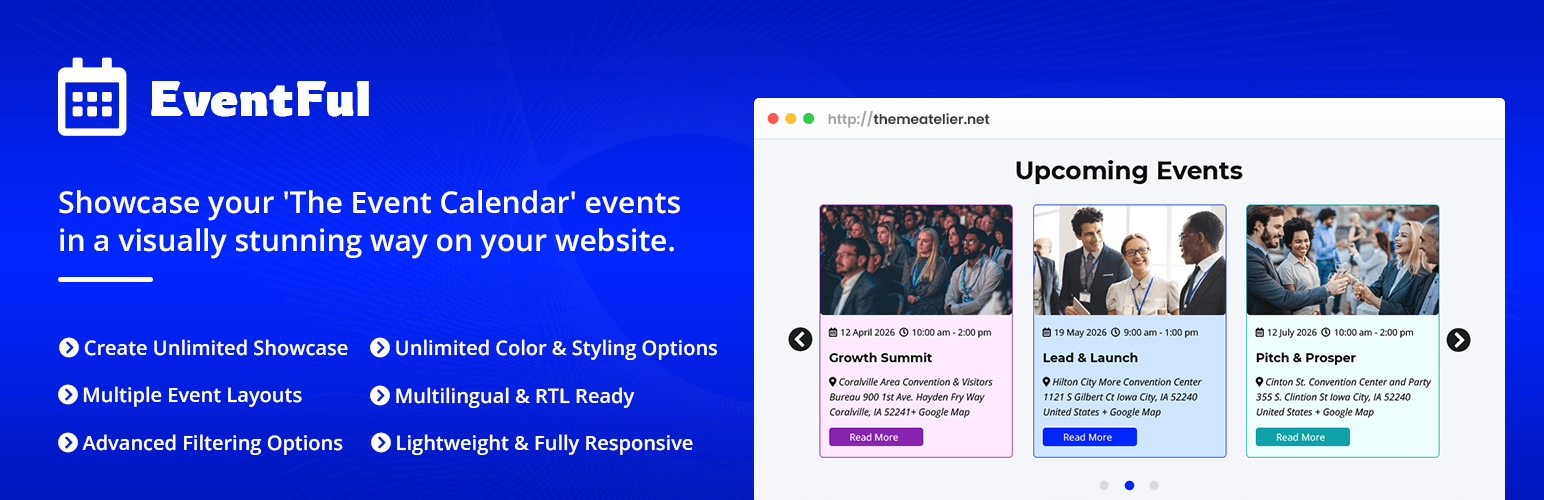
Eventful is built specifically to turn events already stored in The Events Calendar into a carousel, grid, or list — no manual slide-building required. That focus is what makes it one of the best event slider plugin choices for anyone already running The Events Calendar, and what separates it from the general-purpose sliders further down this list.
Because it reads directly from The Events Calendar’s data, upcoming events populate automatically as you add them. The free Eventful Lite version includes carousel, grid, and list layouts, an upcoming-events view, and basic filtering. Eventful Pro adds more layout presets (including ticker and masonry styles), past and all-events views, venue and organizer filtering, and additional pagination and transition options. Pro plans start around $49/year for one site, and pricing is frequently discounted — check current pricing before buying.
The main limitation is the dependency itself: Eventful is an add-on, not a standalone event system, so you need The Events Calendar installed and active first. Builder compatibility (Gutenberg and Elementor) is listed in Eventful’s feature copy, though which tier includes full builder support is worth double-checking on the pricing page, since it can change.
Key features:
- Reads events directly from The Events Calendar — no manual slide creation
- Carousel, grid, and list display layouts
- Autoplay, navigation, and transition controls
- AJAX pagination (Load More, infinite scroll, or numbered)
Best for: Site owners already running The Events Calendar who want their existing events turned into a homepage carousel without rebuilding anything.
2. Modern Events Calendar — Best Standalone Event Plugin With a Built-In Slider
Modern Events Calendar (MEC) is a full event-management plugin with its own event post type, and a slider or carousel view is one of more than 50 layout options included. Unlike Eventful, it doesn’t depend on The Events Calendar at all — it manages events itself.
The free Lite version includes the carousel view along with grid, list, timeline, and countdown layouts, with autoplay and loop controls. MEC Pro layers on booking and ticketing, seat reservations, and additional view types such as map and agenda skins. Pro pricing starts at $99/year for one site.
One thing worth knowing: MEC Lite is no longer listed on the official WordPress.org plugin directory, so you’ll download it directly from Webnus rather than through your dashboard’s plugin search. It’s still actively developed and sold, just distributed through a different channel.
Key features:
- Built-in event management — no separate calendar plugin needed
- Slider and carousel view among 50+ available layouts
- Native Gutenberg support, plus Elementor and Divi compatibility
- Optional booking and ticketing in the Pro version
Best for: Sites that don’t already have an event plugin and want event management and a carousel view in one package.
3. Smart Slider 3 — A General-Purpose Slider With a Real Events Connector
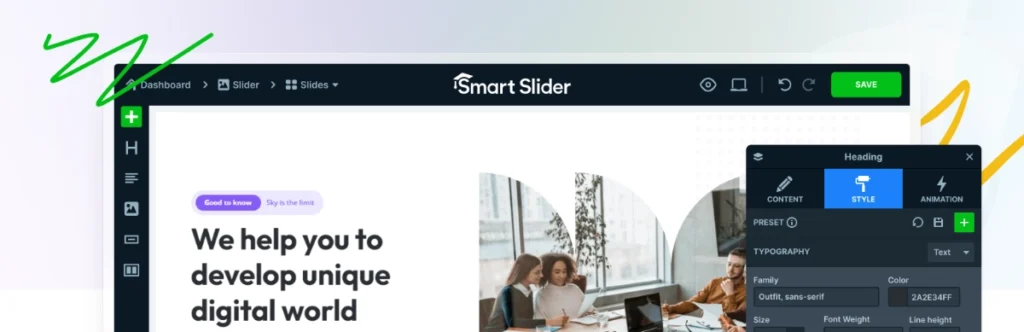
Smart Slider 3 is a widely used general slider plugin, and its “Generator” system can pull dynamic content straight from The Events Calendar — but that specific generator lives in the paid tier, not the free version.
The free version’s Generator only pulls standard WordPress posts. To connect Smart Slider 3 to The Events Calendar (or Events Manager), you need a paid license, which starts at $49 as a one-time purchase for one site. Smart Slider’s own documentation notes that recurring events aren’t supported by the Events Calendar generator, which matters if your organization runs weekly or monthly recurring events.
Where Smart Slider 3 earns its place here is flexibility: once connected, you get a full-featured slider engine with templates, layer effects, and a Gutenberg block, so it works well if you want one slider tool for your whole site rather than a single-purpose events plugin.
Key features:
- Dedicated Events Calendar content generator (paid tier)
- Template-driven slider and carousel engine with layer animations
- Gutenberg block included
- Also supports WooCommerce, social feeds, and custom posts as sources
Best for: Site owners who want one general slider plugin for the whole site, with events as just one of several dynamic content sources.
4. MetaSlider — Familiar Slider Interface, Events as a Pro Add-On

MetaSlider is one of the most established slider plugins on WordPress.org, and its “Post Feed Slides” feature specifically advertises integration with The Events Calendar, alongside WooCommerce products and blog posts.
That Post Feed capability is a Pro feature — the free version handles manual image and slide creation only. Pro pricing starts around $39/year for one site. If your team is already comfortable with MetaSlider for general site sliders, adding an events carousel means one familiar interface rather than a second plugin to learn.
MetaSlider supports Gutenberg out of the box, plus Elementor and Beaver Builder, so it fits into most existing page-builder workflows without extra configuration.
Key features:
- Post Feed Slides pull from The Events Calendar (Pro)
- Responsive image and video slider engine
- Gutenberg, Elementor, and Beaver Builder compatibility
- Simple, widely documented interface
Best for: Existing MetaSlider users who want to add an events carousel without switching tools.
5. Essential Addons for Elementor — Best for Elementor-Built Sites
If your site is built entirely in Elementor, Essential Addons’ Post Carousel widget can display events by pulling from a custom post type — including The Events Calendar’s event type — using the same widget library as the rest of your page.
Essential Addons also ships a separate native Event Calendar widget for calendar-style display, so it’s worth knowing which widget you actually need. The Post Carousel widget specifically is a Pro feature; the free Essential Addons Lite version (available on WordPress.org) doesn’t include it. Confirm current pricing directly, since it’s not published as a fixed number on the site.
The obvious trade-off is the Elementor dependency — this only works if you’re already building pages with Elementor, since the widget doesn’t function outside it.
Key features:
- Post Carousel widget supports custom post types, including event CPTs
- Separate native Event Calendar widget for calendar-style display
- Built directly into the Elementor editor — no separate interface
- Part of a 50+ widget library covering most page-building needs
Best for: Elementor-based sites that want an events carousel built with the same widgets as the rest of the page.
6. Soliloquy — A General Carousel Plugin for Custom Post Type Feeds
Soliloquy takes a more manual approach: its Dynamic content add-on can generate slides from any custom post type, which could include an event CPT, but there’s no purpose-built “events” template the way MetaSlider or Smart Slider 3 offer.
The free Soliloquy Lite version has no dynamic content capability at all. The Dynamic content add-on requires Soliloquy’s Developer tier or higher, which starts around $199/year — noticeably more than the other options on this list. In exchange, you get a dedicated Carousel add-on with thumbnail navigation and lightbox support, plus native Gutenberg block support.
Expect more setup work than a purpose-built event plugin: you’ll be configuring the custom post type source yourself rather than picking “The Events Calendar” from a dropdown.
Key features:
- Dynamic content add-on pulls from any custom post type
- Dedicated Carousel add-on with thumbnail navigation and lightbox
- Native Gutenberg block
- Responsive across mobile, tablet, and desktop
Best for: Sites comfortable configuring a generic custom-post-type feed themselves in exchange for broader carousel design options.
7. LayerSlider — Best for Maximum Visual Design Control

LayerSlider is a design-first slider builder with layered animation effects, and it can filter dynamic content by custom post type, tag, category, or taxonomy as a built-in feature — useful if your events are stored as a custom post type and you want heavy visual customization on top.
There’s no free version and no WordPress.org listing — LayerSlider is sold directly or bundled with certain themes, with a Personal plan starting at $29/year for one site. It doesn’t offer a dedicated integration with The Events Calendar or other event plugins the way MetaSlider or Smart Slider 3 do, so you’re working with generic post-type filtering rather than an events-specific setup wizard.
That trade-off makes sense for design-focused teams who want fine control over transitions and layered animation, and are willing to do a bit more configuration to get there.
Key features:
- Built-in filtering by custom post type, tag, category, and taxonomy
- Layered animation and transition design tools
- Mix of dynamic and static slides in the same project
- Custom field placeholders for pulling specific post data into slides
Best for: Design-focused sites that want deep visual control over a custom-built event carousel and don’t need a purpose-built event integration.
Which WordPress Event Slider Plugin Should You Choose?
The right pick depends more on what you’re already running than on any single “best” plugin. A few common scenarios:
- Already using The Events Calendar: Eventful is the most direct fit, since it reads your existing event data without extra configuration.
- No event plugin yet: Modern Events Calendar gives you event management and a carousel view in one free-to-start package.
- Want one slider tool for the whole site, not just events: Smart Slider 3 or MetaSlider let you handle events alongside other dynamic content.
- Building everything in Elementor: Essential Addons keeps your events carousel inside the same widget library as the rest of your page.
- Want the strongest free option to start with: Both Eventful and Modern Events Calendar offer usable slider or carousel functionality in their free tiers.
- Need maximum visual and animation control: LayerSlider offers the deepest design flexibility, at the cost of a purpose-built events integration.
Event Slider vs Event Calendar: Which One Do You Need?
An event slider and an event calendar solve different problems, and most sites benefit from having both rather than choosing one over the other. A calendar view is best when visitors want to browse, filter by date, or plan ahead. A slider is best when you want to grab attention on a homepage or landing page with only your next few events.
Many of the plugins above, including Eventful, are designed to sit alongside a full calendar rather than replace it — the calendar still handles the “browse everything” job, while the slider handles the “show what’s coming up” job on your most-visited pages. If you’re weighing calendar add-ons more broadly, our guide to the best Events Calendar add-ons covers that side of the comparison.
Frequently Asked Questions
What is the best event slider plugin for WordPress?
The best event slider plugin depends on your setup rather than being one fixed answer. If you already use The Events Calendar, Eventful is purpose-built for that combination. If you don’t have an event plugin yet, Modern Events Calendar offers a free carousel view as part of a full event-management system.
Can WordPress display upcoming events in a carousel?
Yes. Plugins like Eventful and Modern Events Calendar can automatically pull upcoming events into a carousel layout, and general slider plugins such as Smart Slider 3 and MetaSlider can do it too once connected to a supported event data source.
Can I create an event slider for free?
Yes, to a point. Eventful Lite and Modern Events Calendar’s free version both include working carousel or slider layouts at no cost. Most general-purpose slider plugins reserve the dynamic events connection for their paid tiers.
What is the difference between an event slider and an event calendar?
A calendar shows all your events in a browsable date-based layout. A slider highlights a small set of upcoming events in a rotating, attention-grabbing format, usually on a homepage or landing page. They serve different purposes and typically work well together.
Can The Events Calendar display events in a slider?
The Events Calendar itself doesn’t include a native slider view. You’ll need an add-on like Eventful, or a general slider plugin with a verified Events Calendar connector, such as Smart Slider 3 or MetaSlider’s Pro tiers.
Can Gutenberg display an event carousel?
Yes. Most of the plugins in this guide, including Eventful, Modern Events Calendar, Smart Slider 3, MetaSlider, and Soliloquy, offer Gutenberg blocks you can add directly to a page or post to display the carousel.
Picking the best event slider plugin really comes down to matching it to whatever event data you already have. If that’s The Events Calendar, Eventful is worth trying first — the free version is on WordPress.org and gives you a working carousel before you decide whether Pro’s extra layouts are worth it.