


Halloween Is an Event: up to 70% off every Pro plan

Time left: 00d00h00m00s Ends Oct 31, 23:59 GMT

Grab your treat

Live demo · Styling

Style Event Cards in Elementor, No Code Needed

Design your own event cards with the Content and Style tabs: pick which details to show and in what order, set the date format, and style every element with Elementor typography and colours. The three widgets below show the same events, styled three ways.

All 9 widgetsFree & Pro

01

Dark cards with a button

How to set it: Style tab > Box: background #0F1031, radius 20. Title and Event Meta colours set to light tones. Content Fields > Read More Type: Button, then Style > Read More: brand background, pill radius.

Live widget · Style tab only

Outdoor Team Building Retreat

  • Sydney,Australia

02

Content beside the image, meta first

How to set it: Template Styles > Event Content Position: Right (Pro). Sortable Event Elements: Thumbnail, Event Meta, Title, Content, so the date sits above the title.

Live widget · content on the right (Pro)

  • Sydney,Australia
  • $450

Outdoor Team Building Retreat

Three days of shared challenges, facilitated workshops and time to reconnect as a team.… Event details

03

Your own date format and meta

How to set it: Content Fields > Event Meta: Event Time, Organizer, Price. Date Format: Custom, “l, F j”, so dates read “Monday, October 19”.

Live widget · custom date format

Options

What you can customise

Everything below is a control in the Elementor panel. No code needed.

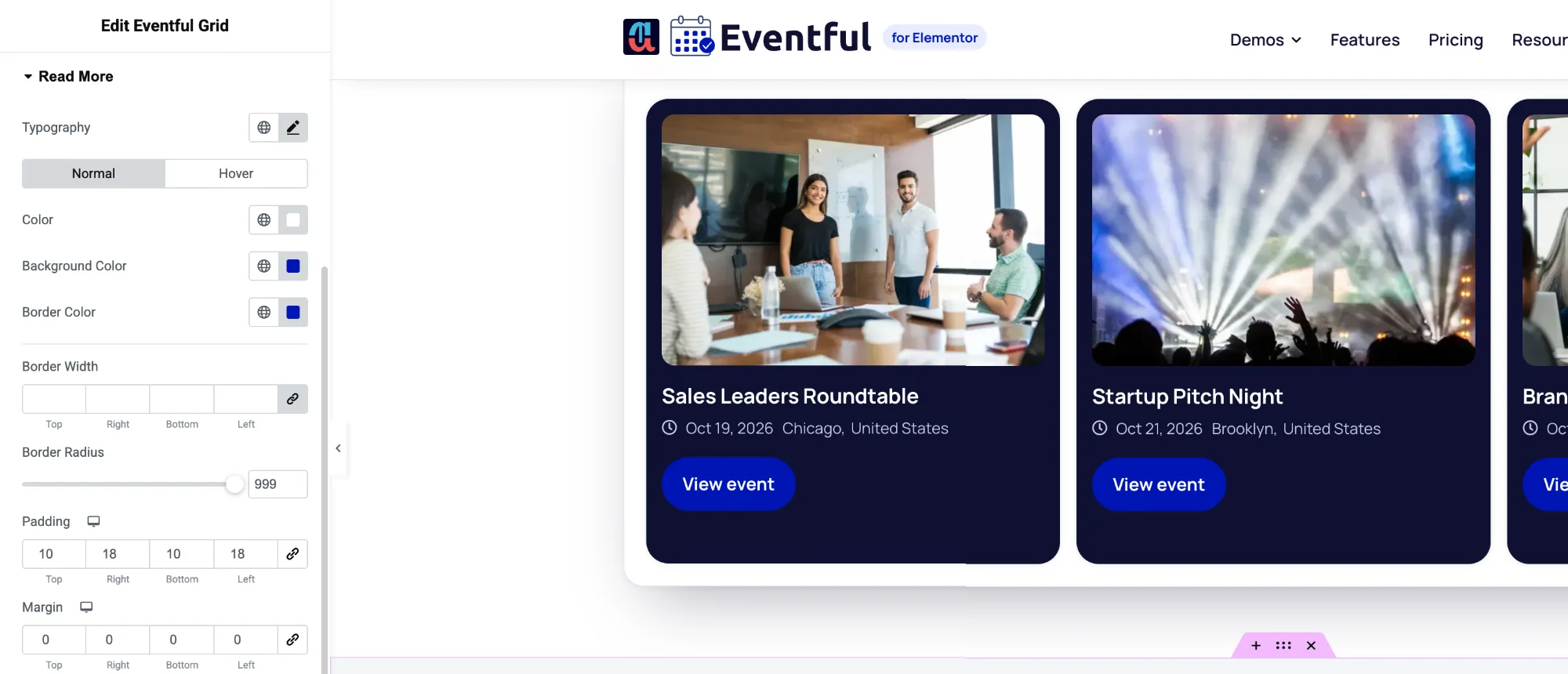
Event styling in Elementor: Read More colours, radius and padding in the Eventful Style tab
The Style tab in Elementor: colours, borders, radius and spacing for the Read More button, with normal and hover states

FAQ

Questions about styling

Still have a question? Ask our team.

Do I need CSS to style the event cards?

No. Every part of the card has its own section in the Style tab, with Elementor typography, colours, borders and spacing.

Yes. With Template Type set to Custom, drag the image, title, meta, content and share buttons into any order, or remove the ones you don’t need.

Yes. Pick one of 12 formats, or choose Custom and type any PHP date format, such as “l, F j” for “Monday, October 19”.

Last updated:

Give your events the layout they deserve

Nine Elementor widgets, AJAX filters and full style control. Try the free version or go Pro today.