

Features
Eventful for Elementor Features
Every Eventful for Elementor feature in one place: 9 Elementor widgets for The Events Calendar, AJAX filters and search, query control, pagination, ready-made designs and full styling in the Elementor panel. Each section links to a live demo.
Widgets
9 Elementor widgets, one per layout
Each layout is its own widget in the “Eventful” category of the Elementor panel, so each panel shows only the controls that apply. The Ticker is a mode of the Carousel.
Elementor
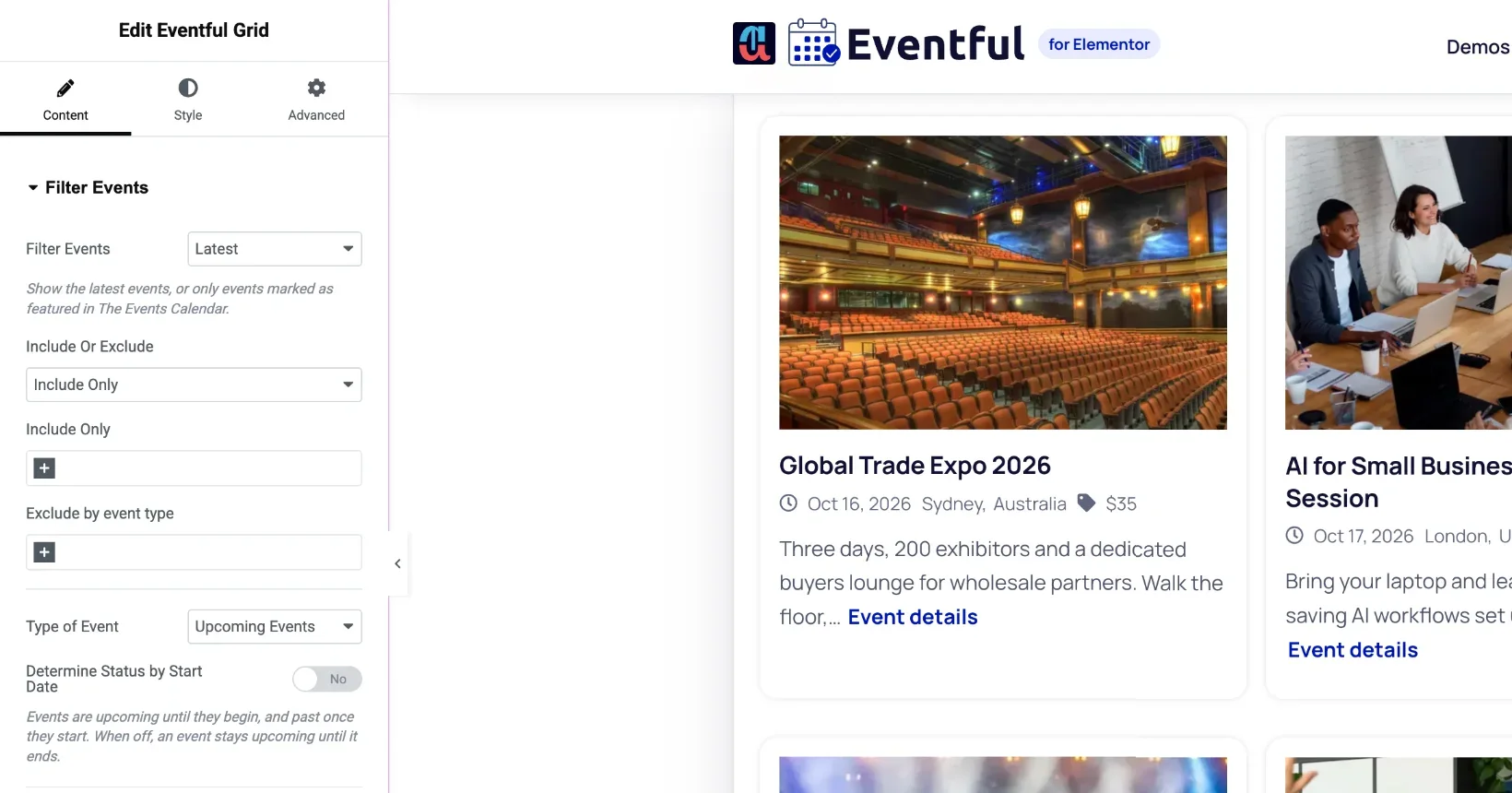
Built into the Elementor editor
Eventful widgets behave like any other Elementor widget: drag them onto a page or template, see changes live, and style them with your Global Colors and Fonts.
- Drag and drop onto any page, no shortcode
- Live preview: the editor redraws the widget as you change a setting
- Typography, colours, borders and shadows in the Style tab
- Global Colors and Fonts on content and Read More
- Per-device settings with Elementor's responsive switcher
- Advanced tab: motion effects, transforms, background, hide per device
- Custom CSS classes and ID on every widget
- Each widget can be switched off in the plugin settings
Query
Choose which events each widget shows
Every widget has its own query, so one page can show this week’s featured events in a carousel and past events in a list.
- Latest or featured events
- Upcoming events (free), past or all events (Pro)
- Include only, or exclude, chosen events
- Exclude the current event or password-protected events
- Hide free events or events without an image
- A specific date, a year, or a from-to period
- A fixed keyword
- Order by start date, title, ID, slug or random
- Condense recurring event series (with Events Calendar Pro)
- Optional schema.org Event markup
AJAX filters
Let visitors filter and search
Add a live filter bar and search box above any widget. Results update without a page reload.
- Filter by category, tag, venue, organizer, event type, timeframe, month or year
- Timeframes such as Today, This Week, Upcoming Weekend and Next Month
- Operators IN, AND and NOT IN, with AND or OR between filters
- Buttons (free), dropdowns, radios and checkboxes (Pro)
- Event counts and "hide empty" per filter
- 1 to 6 filter columns, set per device
- Live keyword search with a Reset button
- Show/Hide Filter button next to the search box
Pagination
Pagination that suits the page
Grid, List, Masonry, Minimal List, Timeline, Table and Accordion can split long lists into pages. Carousel and Slider use their own dots or numbers.
- Load More button with AJAX (free)
- AJAX number pagination (Pro)
- Infinite scroll (Pro)
- Normal page links without AJAX (Pro)
- A separate pagination type for mobile
- Events per page and a total limit
- Load More label and end-of-list message
- Normal and active colours in the Style tab
Design
Ready-made designs or your own card
Start from a pre-made template, or build your own card from the content fields and style every part of it.
- 3 pre-made templates for Grid, List, Minimal List, Table and Accordion
- Carousel, Slider, Masonry and Timeline use the Grid templates
- Separate colours for featured events
- Per-field show/hide on templates (Pro)
- Template files you can override from your theme
- Drag to reorder or hide image, title, meta, content and share buttons
- Content below, beside or over the image (beside and over are Pro)
- 12 date formats or your own
- Image zoom, grayscale and video or audio in place of the image (Pro)
- Share buttons: 5 networks free, 13 in Pro
Layouts
Options for each layout
Each widget adds the controls its layout needs.
- Carousel: Standard, Center, Ticker and Multi Row (the last three are Pro)
- Carousel: columns, rows and slides to scroll for large screens, tablets and phones
- Carousel and Slider: 9 arrow positions, 7 arrow sets, dots or numbers
- Slider: Fade, Coverflow, Cube and Flip effects (Pro)
- Timeline: 5 vertical and 3 horizontal designs (Style 01 vertical is free)
- Table: sortable columns, sticky header, scroll or stack to cards on phones
- Accordion: first open, all open or all folded, with your own icon
- List: image on the left or right
Requirements
What you need
Requirements
- WordPress 6.0 or later
- PHP 7.4 or later
- Elementor 3.5 or later (the free version is enough)
- The Events Calendar (the free version is enough)
Good to know
- Assets load only on pages with an Eventful widget
- Bundled libraries use their own names, so they do not clash with Elementor's Swiper
- Right-to-left or left-to-right carousel direction
- AJAX requests pass the current language, for use with WPML or Polylang
Which features are in the free version?
The free version on wordpress.org has 5 widgets (Grid, Carousel, Slider, Minimal List and Timeline), upcoming events, button filters, live search and the Load More button. See Free vs Pro for the full list.
Does it replace The Events Calendar's own pages?
No. The Elementor edition adds widgets you place on your pages. The calendar views and single event pages from The Events Calendar stay as they are. The shortcode edition of Eventful can replace the archive pages.
Can I override the templates?
Yes. Every template is a PHP file that a theme can override from a folder named eventful-pro-for-elementor inside the theme.
Last updated:
Give your events the layout they deserve
Nine Elementor widgets, AJAX filters and full style control. Try the free version or go Pro today.