Live demo · Carousel
Elementor Events Carousel for The Events Calendar
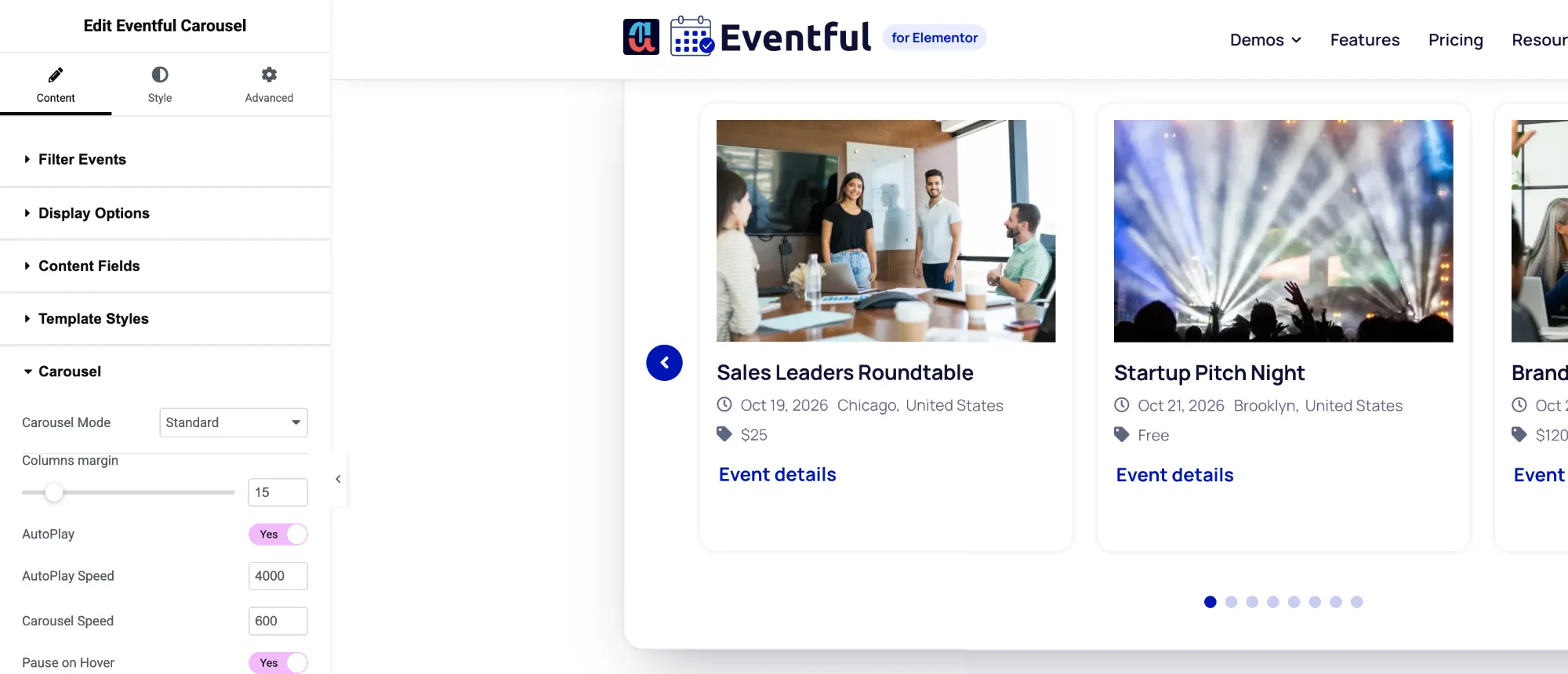
Turn your events into a touch-friendly carousel with the Eventful Carousel widget. Set columns, rows and slides-to-scroll for large screens, tablets and phones, pick a carousel mode and a transition, and style the arrows and dots in the Elementor panel. Every carousel below is the live widget.
Eventful Carousel widgetFree & Pro
01
Standard Elementor events carousel
How to set it: Carousel Mode: Standard. Columns: 3 on desktop, 2 on tablet, 1 on mobile. AutoPlay on, Pause on Hover on, arrows Vertically center outer.
Live widget · standard mode
02
Center mode
How to set it: Carousel Mode: Center. The active event sits in the middle with the next and previous events peeking in. Columns: 3.
Live widget · center mode (Pro)
03
Two rows per slide
How to set it: Carousel Mode: Multi Row. Rows: 2 on desktop and tablet, 1 on mobile. Pagination Type: Number.
Live widget · multi row + number pagination (Pro)
04
Coverflow transition
How to set it: Carousel Mode: Standard, Transition Effect: Coverflow. Columns: 3. Images only plus title for a gallery feel.
Live widget · coverflow (Pro)
Options
What you can customise
Everything below is a control in the Elementor panel. No code needed.
- Carousel modes: Standard, Center (Pro), Ticker (Pro), Multi Row (Pro)
- Transitions: Slide, plus Coverflow (Pro)
- Columns, rows and slides-to-scroll for large screens, tablets and phones
- AutoPlay, speed, pause on hover, infinite loop, lazy load
- Right-to-left or left-to-right direction
- Arrows: show, hide or hide on mobile; 9 positions; 7 icon sets
- Dots or number pagination (number is Pro), dynamic bullets
- Touch swipe, mouse drag, mouse wheel and keyboard navigation
- Editable accessibility messages for screen readers
- Arrow and dot colours, size, border and radius in the Style tab
- All Grid card options: image, meta, excerpt, read more, ready-made designs
- AJAX live filters above the carousel
Is the Carousel widget in the free version?
Yes. Eventful Carousel is in the free version with the Standard mode and the Slide transition. Pro adds the Center, Ticker and Multi Row modes, the Coverflow transition and number pagination.
Can I set a different number of columns on mobile?
Yes. Columns, rows and slides-to-scroll can be set separately for large screens, tablets and phones.
Is the Elementor events carousel accessible?
It supports keyboard and tab navigation, touch swipe and mouse drag, and you can edit the messages screen readers announce for the previous, next, first and last slide.
Last updated:
Give your events the layout they deserve
Nine Elementor widgets, AJAX filters and full style control. Try the free version or go Pro today.