

Table of Contents
Split a long list of events into pages with Load More, page numbers or infinite scroll.
Pagination works on Grid, List, Masonry, Minimal List, Timeline, Table and Accordion. Carousel and Slider use their own dots or numbers instead.
- Open Content > Pagination and turn on Pagination.
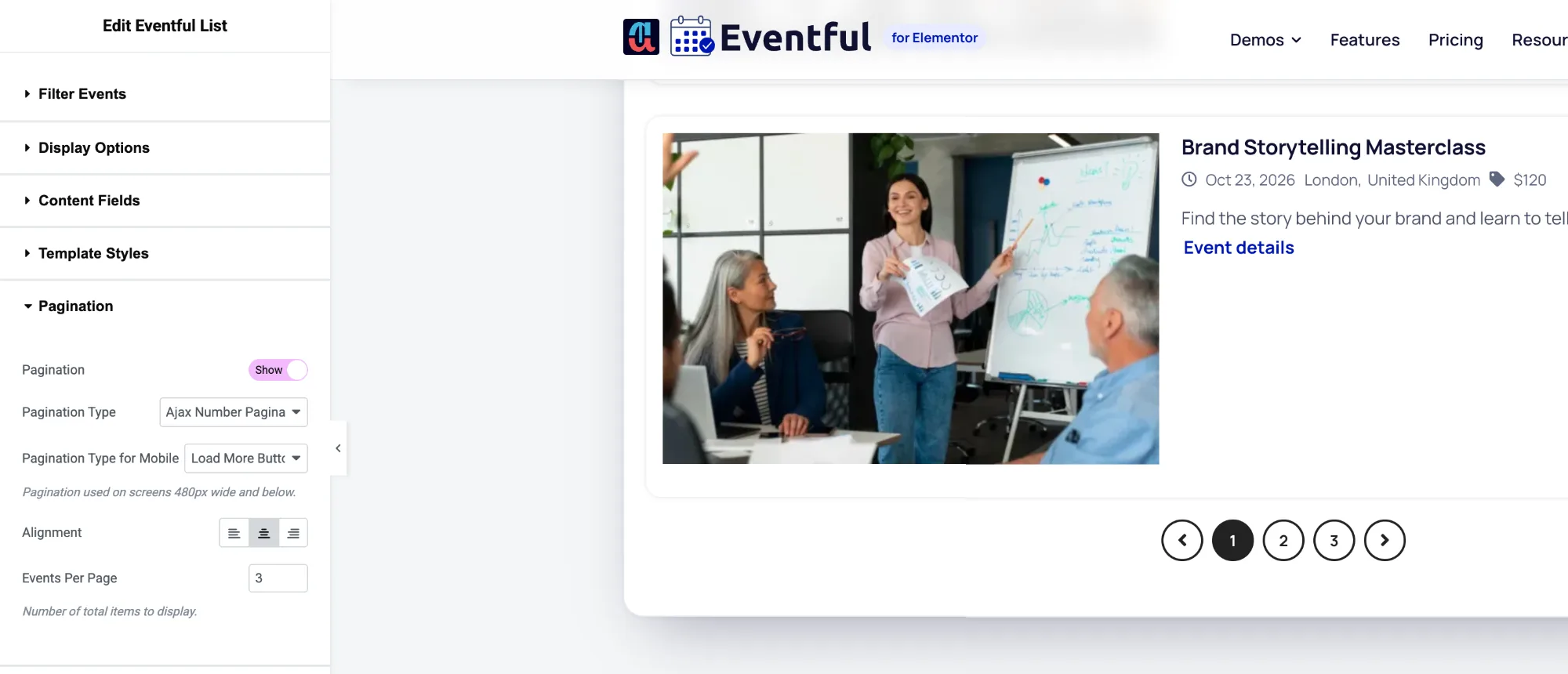
Content > Pagination. - Choose a Pagination Type (see the table below).
- Set Events Per Page: how many events show at first, and how many each step adds.
- Set the total in Content > Filter Events > Limit. For example, Limit 12 and Events Per Page 4 gives three pages.
| Pagination Type | What visitors see | Version |
|---|---|---|
| Load More Button (Ajax) | A button below the events that adds the next set without reloading the page. | Free |
| Ajax Number Pagination | Page numbers and arrows; each click swaps in that page without reloading. | Pro |
| Infinite Scroll (Ajax) | More events load when the visitor reaches the end of the list. | Pro |
| No Ajax (Normal Pagination) | Page links that load a new page address, like a blog archive. | Pro |
Labels and alignment #
- Load More Button Label: the button text, for example “Load more events”.
- Ending Message: shown when there are no more events, for example “No more events to show”.
- Alignment: left, centre or right.
Filters and search work together with pagination: after a visitor filters, pagination continues within the filtered events.


